DayPrivate / Goal setting app
Outcomes, Purpose, pace
A goal setting app that keeps the books on the day.
Most goal setting apps are habit trackers wearing a serious label, or OKR software built for a company cascade. DayPrivate is neither. A goal here is an outcome with a Result, a Purpose, and a pace. The app tells you where the hours went, which goal is behind, and which one has not been touched in days.
DayPrivate is a goal setting app for Mac, iPad and iPhone that sits inside a local first outliner. You point work at a goal. Alignment shows tracked time by goal, names the unaligned hours, and flags drought days. A dated, estimated goal gets a pace verdict and a button that books the make up time in hours that are actually free.
There are no streaks, no rings, no team OKRs, no Windows or Android build, and no DayPrivate server. Eight dollars a month or sixty nine a year. Not on the App Store yet.
The aisle this is not
Habit streaks and OKR dashboards are a different product.
If you searched goal setting app because you want to floss more days in a row, or because your company runs quarterly key results, DayPrivate is about outcomes with a clock attached.
Habit apps measure repetition. They are good at that. A streak is a count of days you touched a checkbox. It cannot tell you whether the work that matters got hours, and it rewards showing up empty. DayPrivate does not freeze a streak, celebrate a ring, or shame a missed day. It counts time against a Result.
OKR software measures a team. Objectives cascade, key results get scores, dashboards fill with status. DayPrivate has no company workspace and no scoring ritual. Year Plan holds the outcomes that must be true by the end of a quarter, assigned to the goals Alignment already reads. That is a personal year sitting in the same file as Tuesday, not a SaaS layer on top of your life.

How a Tuesday earns the goal
Result, Purpose, and the two flags that sort a day.
A goal that never reaches the day is decoration. In DayPrivate you name two or three outcomes for today. Each states the Result you want by tonight and the Purpose behind it. The actions underneath are MUST or SHOULD. Two flags, not four. The must total is visible, so an overloaded day is a number rather than a feeling at 16:00.
Those outcomes can point at a goal. The timer you run on the action writes tracked time onto both the bullet and the goal. That is the whole link. There is no separate goals database you have to keep in sync. The goal is a bullet. The day is made of bullets. Alignment reads them.
Naming a Result and a Purpose before the actions is the same daily shape the rapid planning method uses. DayPrivate's rapid planning method app page is the long version of that daily structure. This page stays with the goal: pace, alignment and droughts over weeks, not the morning card.
A goal reaching the day
Two qualified leads in the pipeline
Because December closes on what July started.
Where the hours went
Alignment names the work, including the work that pointed at nothing.
A goal setting app that only shows what you meant to do is a wish list. Alignment is the after picture: tracked time by goal or by area, the unaligned row always visible, and a repair sitting on the same screen.
Thirty days of tracked time, demo numbers
Click the unaligned row and you get the nodes that ate time with no goal, each with a picker to link them. The report is also the repair. A starved goal gets a drought line: no time in so many days, then two verbs, block time or demote it. Demote is a relocate under a Someday sibling, undoable. There are no nudge toasts elsewhere. A quiet line in Plan when droughts exist is the only prompt, and it opens Alignment.
Tracked hours per goal, unaligned time, and a goal that has been starved. Fictional projects in an isolated demo database. Capture from the working build.
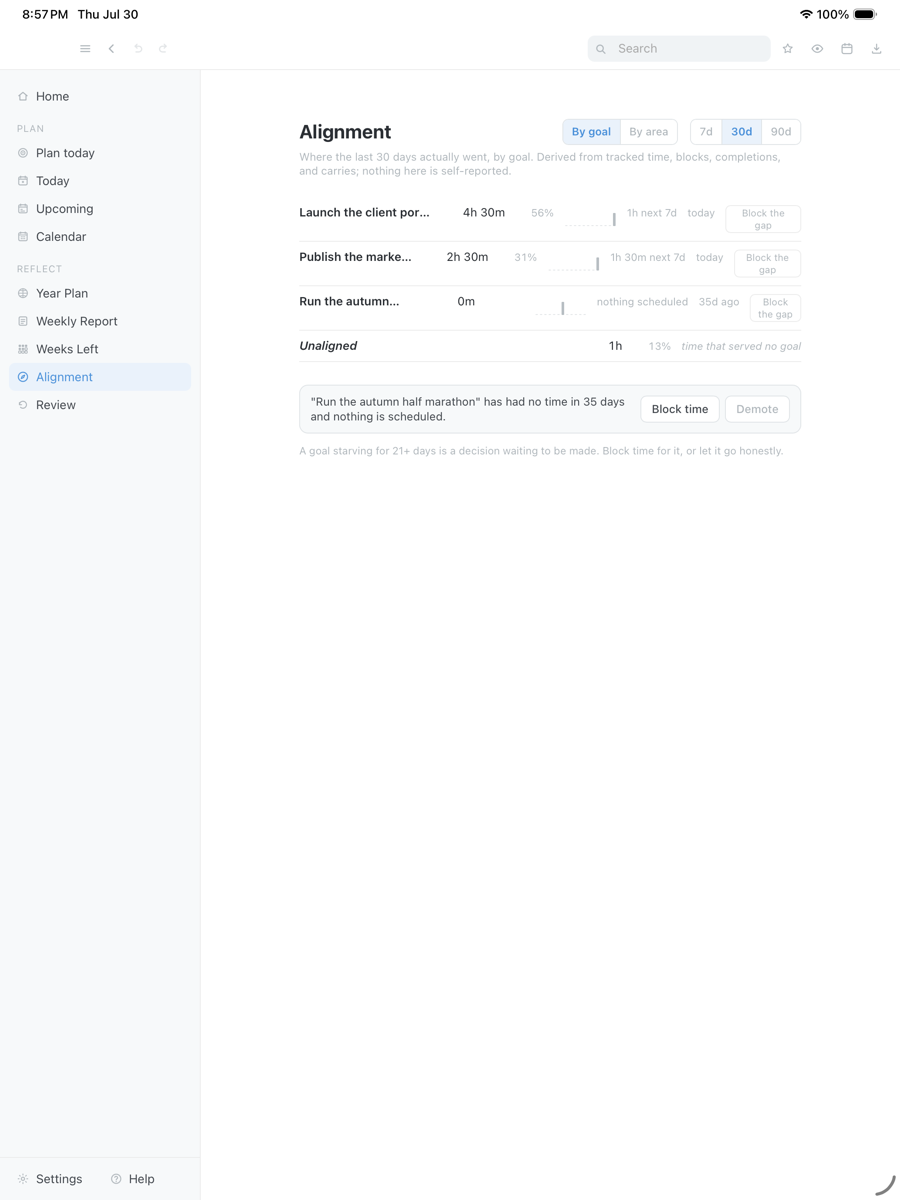
Drag the capture sideways to see the rest. Open full size
The gap
Pace, the gap, and drought days.
A dated, estimated goal can do arithmetic you should not do in your head. Hours left, weeks left, average tracked hours per week, and a verdict: on pace, or behind. Behind is not a score. It is a gap in hours, and a button that books that gap into genuinely free time, around the calendar the app can already read.
The goal with hours under it
Tracked share matches the estimate against the date. Nothing to book. Keep pointing days at it.
Behind, with a repair
The shortfall is a number of hours. Block the gap finds free time and places the work. It will not invent hours that are already taken.
No time in days
A goal that has not been touched. Block time, or demote it so it stops pretending to be active.
Area targets cover the steady maintenance work that never becomes a dated goal: a share of the week, visible when it starves. Compass holds Vision, Identity and Standards, with reset recordings and thirty day experiments beside them. Year Map is a read only footprint of the year, one cell per day, colored by what the plan actually did with it. None of that is a habit calendar.

Looking back
The week is a readout, not a planning grid.
DayPrivate will not sell you weekly planning. The week view shows what the days already held. Review opens on the last complete Monday to Sunday week and reads each goal's tracked share, the time aligned to nothing, and how each dated goal's pace stood as the week closed. Next week can offer to block the gap of a goal that is behind, in hours that are free. It does not ask you to lay out seven days of intention on Sunday night.
None of it is self reported. It is your tracked time, your blocks, your carries and your calendar. It never asks you to rate the week or journal about it. If you want a guided weekly planning session, a premium daily planner in that tradition will fit better.
Direction around the goals
Compass, Year Plan and Year Map sit in the same file.
Compass holds Vision, Identity and Standards. You can attach reset recordings, transcribed on the device, and thirty day experiments beside them. That is direction you wrote, not a coach worksheet and not a corporate values slide. Year Plan is the outcomes that must be true by the end of each quarter, assigned to the goals Alignment already reads. Year Map is a read only footprint: one cell per day, colored by what the plan actually did with it.
Purpose is the sentence that keeps a goal from becoming a trophy. A Result without a Purpose will still take hours. A Purpose without a Result will not tell you when you are done. DayPrivate asks for both on the day, and the goal inherits the time those days spent. Weeks Left shows a dated goal as a grid of weeks, with a pace reading when the estimate and the history exist, and stays quiet when they do not.
Native Mac, iPad and iPhone. Apple Calendar read on every device. Blocks mirrored back on the Mac. No Windows, no Android, no web. No AI auto-scheduler. Auto-block will lay out a day you already chose. It will not invent a quarter of work from a priority score.
Where the goals live
The same local file as the rest of the outline.
Goals are not a cloud object. They sit in the database file on your disk, next to the days that feed them. Encrypted sync through your own iCloud Drive is optional. There is no DayPrivate server. Export the current zoom to OPML or plain text. CSV and HTML export the current week or month of the weekly report, not the goal tree. Native Mac, iPad and iPhone. No Windows, no Android, no web. The marketing site uses ordinary web analytics. The app measures nothing.
Straight answers
When a different goal setting app is the better call.
- You want habit streaks. Buy a habit app. DayPrivate will not count days you opened it.
- You want company OKRs. There is no team workspace, no scoring, no cascade.
- You want Windows or a browser. DayPrivate is Mac, iPad and iPhone only.
- You want the app to decide the goals. It will not rank your life or auto schedule your year. Auto-block lays out a day you already chose.
- You want something this afternoon. Not released, not on the App Store yet.
Price
DayPrivate is eight dollars a month, or sixty nine a year.
One plan, every Apple device you own, one person. If the plan lapses, the last version you paid for keeps working. See what the plan includes.
One message, then nothing
Hear when the build is ready.
One email when DayPrivate is ready to install, and nothing else. No drip sequence and no newsletter.
Your address is used for that one message and nothing else.
Questions
Goal setting questions.
What kind of goal setting app is DayPrivate?
An outcomes app, not a habit app and not an OKR dashboard. You point work at a goal. The app keeps the books: tracked time, share of the week, commitments still on the calendar, pace against a date, and drought days when a goal got no time.
Does it track habit streaks?
No. There is no streak, no freeze, no ring to close. DayPrivate measures hours against a Result and a Purpose. If you want a habit streak, use a habit app.
What are drought days?
A drought is a goal that received no tracked time for a stretch of days. DayPrivate names it on Alignment and offers two verbs: block time, or demote the goal. There is no toast elsewhere. The report waits until you open it.
Is this an OKR tool?
No. There are no company objectives, no key result scoring, no team cascade. Year Plan holds the outcomes that must be true by the end of a quarter, assigned to the goals Alignment already reads. That is a personal year, not SaaS OKRs.
Does DayPrivate run on Windows or Android?
No. Native Mac, iPad and iPhone only. No browser version. The day planner app page has the device table.
How much does DayPrivate cost?
Eight dollars a month or sixty nine dollars a year, one plan, one person, every Apple device you own.
Can I try it today?
Not yet. The build is in daily use and under active development, but it is not publicly released and it is not on the App Store. The form on this page is how you hear when there is something to install. The product overview walks through the whole app.