DayPrivate / Day planner app
Mac, iPad, iPhone
A day planner app that has to survive contact with the clock.
Most day planner apps are a nice place to write the day down. The trouble starts at 15:45, when the plan and the day have quietly stopped being the same thing and nothing in the app has noticed. DayPrivate is an outliner for Mac, iPad and iPhone with a real clock attached: pick the two or three outcomes today owes you, block them against hours the day actually has, and get told once, while you can still do something about it, when a block ends with a MUST still open. The whole outline is a file on your disk.
The thirty second answer
DayPrivate on the day planner app shortlist, in one paragraph.
DayPrivate is a day planner app for Mac, iPad and iPhone at eight dollars a month or sixty nine a year, one plan, every device, built for one person. Instead of a list, you name the two or three outcomes today owes you, block them against the hours the day actually has, and hear about it once when a block ends with a MUST still open. Your outline is a local file, with no account and no company server. It is not on the App Store yet; the form at the bottom of this page is how you hear when there is something to install.
If your question is narrower, DayPrivate's time blocking app page covers the grid and auto-block, and DayPrivate's rapid planning method app page covers planning by outcome. And if your day happens on Windows or Android, stop reading now: DayPrivate is Apple only, and a different daily planner will serve you better.
Before the shortlist
Four different products share the name day planner app. Work out which one you are shopping for.
Search day planner app, daily planner app or digital day planner and you get app store listings, a Reddit thread and a stack of ranked roundups, all using one word for four unrelated designs. DayPrivate sits in the last category below. Naming the categories first saves a month, because the wrong category is usually why the last one did not stick.
There is a fifth option this list leaves out, because it is not an app at all. If a bound book or a printed page is still on your shortlist, the daily planner page sets paper and software side by side, layout by layout.
The question behind the search
What is the best app for planning your day?
There is no single best app for planning your day, and a ranked roundup that says otherwise is usually ranking its own tool first. The best day planner app is the one whose design matches how your day goes wrong: a calendar if other people's meetings own your hours, a list if you only need to remember things, an automatic scheduler if your real constraints are typed in somewhere, and an outliner with a clock attached, which is what DayPrivate is, if your thinking and your plan need to live in one document. DayPrivate is eight dollars a month or sixty nine a year on Mac, iPad and iPhone, it keeps the outline in a local file with no account, and it is not on the App Store yet.
| What you want from a day planner app | Calendar first | List first | Auto scheduler | DayPrivate |
|---|---|---|---|---|
| Plans against the free hours you actually have | Yes | No, the list has no clock | Yes | Yes |
| Says something when a block ends with work still open | Nothing happens | Nothing happens | It reshuffles for you | One card, once |
| Plan, blocks and tracked time are the same document | Separate apps | Separate apps | Separate apps | One outline |
| You decide what today is about, not a priority score | Yes | Yes | The software ranks it | Yes |
| Runs with no account and no company server | Account required | Usually an account | Account required | Local file |
Each column is a design, not a verdict. Plenty of people run a good day out of a calendar and a list, and if that is already working for you, the honest advice is to keep it and stop shopping.
The questions the roundups skip
Six things to check before you hand a year of days to a day planner app.
Ranked roundups compare feature counts. These are the six answers that decide whether you are still using the app in March, and DayPrivate's answer sits under each one, including the places it says no.
Does it plan against hours you actually have?
A plan that ignores your meetings is a wish list with timestamps. Check whether the app reads the calendar you already keep, and what it does when it cannot see your availability. DayPrivate reads Apple Calendar on all three devices, treats other people's events as context that never counts toward your planned or tracked time, and if auto-block cannot read your free hours it books nothing and says so rather than scheduling blind. If this is the part you care most about, the time blocking software page is the long version.
What happens the moment you miss a block?
In most planners, nothing. That silence is how a day slides without anybody deciding anything. In DayPrivate one card appears when a block ends with a MUST still open, offering re-block today, tomorrow, or leave it, and dismissing it counts as a decision, so it never asks twice about the same ending.
Where does the file live, and can you read it without the app?
Ask this before you commit, not after. DayPrivate writes to a database file on your own device and Settings shows you its exact path. You can export the whole outline to OPML, plain text, CSV, or a self contained HTML report whenever you like.
What leaves the device, and can you tell?
Plans are among the most revealing text you will ever type. The only traffic that leaves a DayPrivate device is traffic you asked for: encrypted sync through your own iCloud Drive, or a calendar you connected. The optional AI features talk to a model on the same computer, and any endpoint that is not this machine is refused in code rather than in a settings toggle.
Does the weekly review come from you, or from the data?
A review that asks you to rate the week is measuring your mood on Sunday night. DayPrivate's is derived from your tracked time, your blocks, your carries and your calendar, read back to you. It never asks you to score anything or journal about it.
What do you keep if you stop paying?
The one worth reading the fine print for. Here, the last version you paid for keeps working, and your outline and exports stay on your disk. An active plan pays for future updates, never for access to your own work.
Getting off the ground
Your first day in DayPrivate, in four moves.
No workspace to build, no projects to define, no account to make. A guided tutorial of fifteen short steps opens itself the first time and can be run again from Settings, but the shape of a day is this.
Write the day down
Open DayPrivate and start typing. Enter, Tab, Shift and Tab, notes under any bullet, Cmd and K to jump anywhere. It is an outliner before it is a planner, so this part costs you nothing.
Name what today owes you
DayPrivate asks for two or three outcomes, each with the result you want by tonight and your reason for it. Then the actions underneath, marked MUST or SHOULD. Past three outcomes a quiet chip mentions it. Nothing is ever blocked.
Put it on the clock
Drag an action onto DayPrivate's day grid and the block takes its estimate, or block a whole outcome as one chunk and work the actions from inside it. Auto-block does the day in one press, around your calendar, and names what did not fit.
Let the day answer
Start a DayPrivate timer on the thing in front of you, one at a time. When a block ends with work open you get one card. Next morning a carry tray offers yesterday's unfinished work forward, one day at a time.
Outcome card, the unit the day is built from
Two qualified leads in the pipeline
Because December closes on what July started.
If naming a result and a purpose before the actions sounds familiar, that is deliberate. Here is how DayPrivate builds the rapid planning method in.
What it looks like
The DayPrivate day planner, in two captures from the working build.
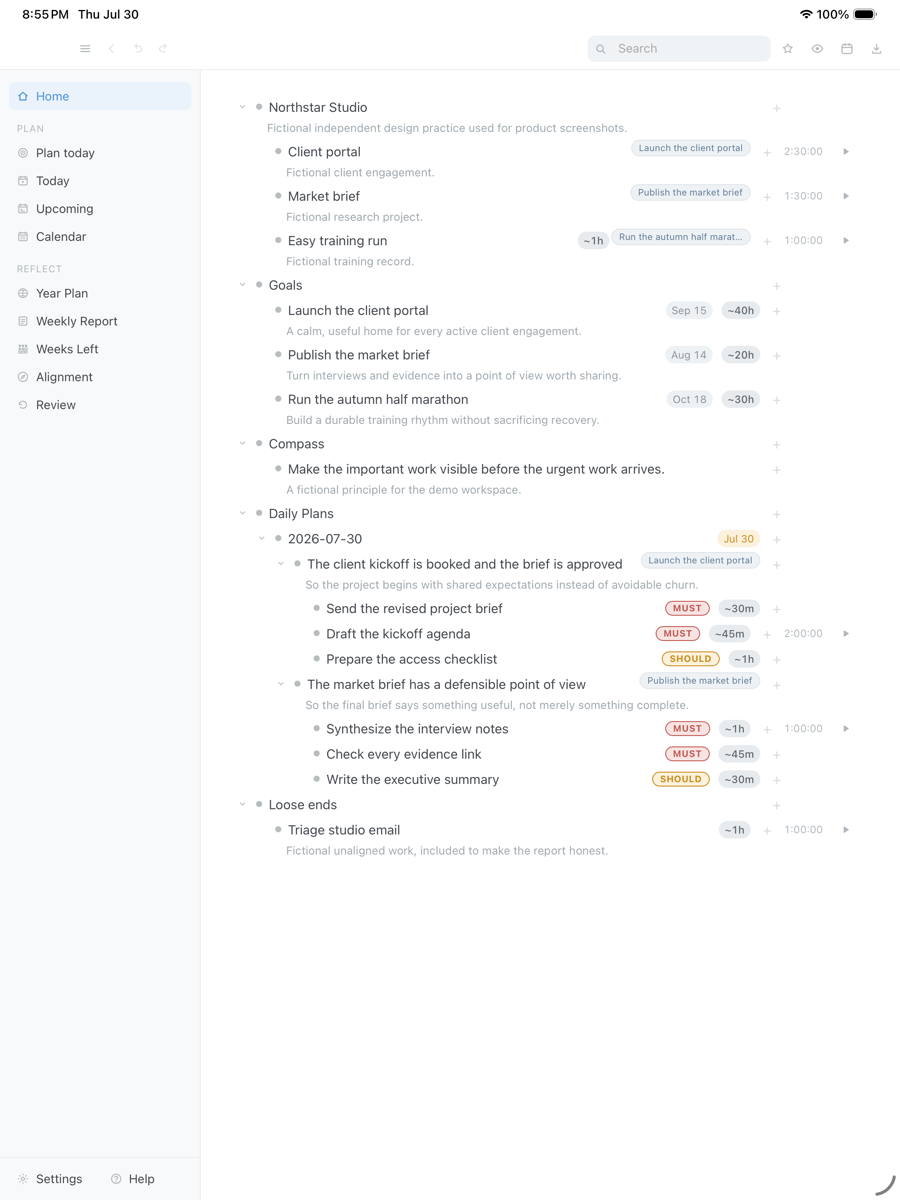
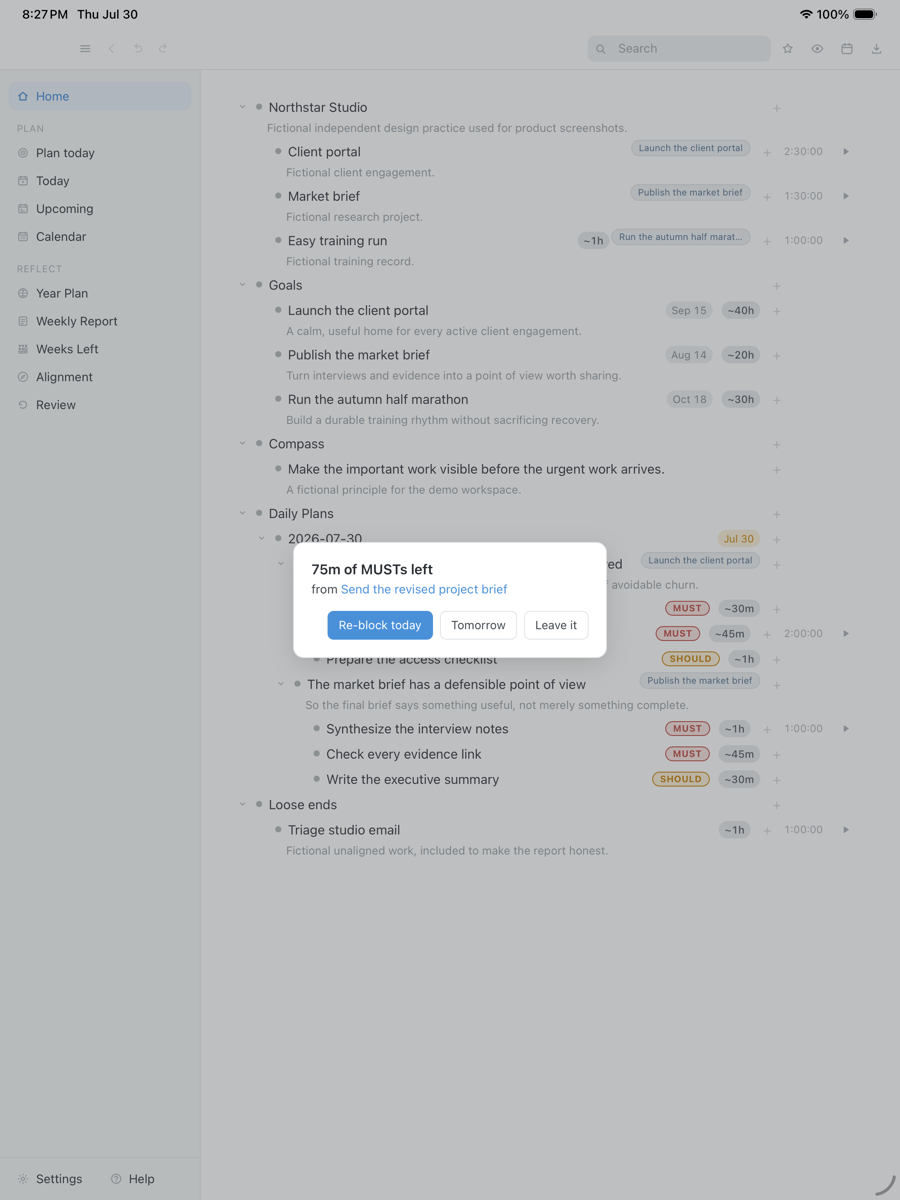
Every app store listing on this search shows you the day planner before you commit to it. DayPrivate has no listing yet, so here are two captures taken on an iPad from the build in daily use. Every name, project and time in them is invented for the screenshot.
Two outcomes for the day, each stating what will be true tonight and why it matters, with the MUST and SHOULD actions underneath carrying their own estimates. The same bullets go on the grid and collect the tracked time.
Drag the capture sideways to see the rest. Open full size
A block ended with seventy five minutes of MUSTs unfinished, so DayPrivate says so once and offers three answers: re-block today, tomorrow, or leave it. Dismissing the card counts as a decision, so it does not come back about the same ending.
Drag the capture sideways to see the rest. Open full size
What the app does with your data
The disclosure an app store would ask of a day planner app, written out for DayPrivate in full.
App store listings compress this into a card of categories. DayPrivate has no listing to read yet, so here is the same accounting in plain sentences.
Not collected
Bullets, plans, notes, blocks, and tracked time are written to a database file on your device. There is no account and no company database holding any of it.
Nothing measured
No analytics, no crash pings, no usage counters. Not anonymised, not aggregated, none. This marketing site is a separate thing and does use ordinary web analytics.
Your own iCloud Drive
Devices exchange encrypted change sets through iCloud Drive under a passphrase that stays in the device keychain. Nobody else can read those files, including this app's author.
Read on the device
Apple Calendar on Mac, iPad and iPhone. Google Calendar is Mac only and read only, connected with your own OAuth client, with the tokens in your keychain.
Loopback only
Optional, and off until you install a model on your own machine. Any endpoint that is not this computer is refused in code, and there is no cloud fallback to fail over to.
Transcribed on the device
Vision, identity, and reset recordings go through Apple's on device speech recognition on Mac, iPad and iPhone, so the audio itself is not sent anywhere.
Where it runs
DayPrivate runs on three devices, one outline, with a short list of Mac only parts.
Every day planner app claims to run everywhere. This is DayPrivate's honest version: some surfaces are macOS only because they are native macOS surfaces, and the table says which.
Day planner app for Mac
DayPrivate on the Mac is the full day planner: day and week grids, the running task and its elapsed time in the menu bar, a global quick capture hotkey, Google Calendar as a read only source, blocks mirrored back into a calendar you choose, and the optional local AI features. Your outline is a database file on that Mac, and Settings shows you its exact path.
Day planner for iPad
DayPrivate on the iPad is the same outline with touch on it: sheets, gestures, multi bullet selection, and dragging a bullet straight onto the day grid with a finger. Both captures further up this page were taken on an iPad. Apple Calendar is read on the device, and the Mac is the machine that writes your blocks back into a calendar.
Day planner app for iPhone
DayPrivate on the iPhone carries the whole outline rather than a trimmed pocket version: the plan, the blocks, the timers, the carry tray and encrypted sync all work. What is missing is the menu bar timer, quick capture and Google Calendar, which are macOS surfaces. There is no Apple Watch app, so the day lives on the phone screen.
Windows, Android and the browser
DayPrivate has no Windows build, no Android build and no web version, and none of the three is planned. Say it early because plenty of day planner searches start on a Windows PC: if that is your machine, this is the wrong shortlist. DayPrivate's daily planner page is the better read in that case, since layouts and paper do not care what computer you own.
What DayPrivate does on each device, capability by capability
| Capability | Mac | iPad | iPhone |
|---|---|---|---|
| Outline, plans, blocks, timers | Yes | Yes | Yes |
| Encrypted device sync | Yes | Yes | Yes |
| Touch gestures, sheets, multi select | Pointer instead | Yes | Yes |
| Read your Apple Calendar | Yes | Yes | Yes |
| Mirror blocks back into the calendar | Yes | Mac writes it | Mac writes it |
| Google Calendar | Yes | Not yet | Not yet |
| Menu bar timer and quick capture | Yes | macOS only | macOS only |
| Local AI features | Yes | macOS only | macOS only |
| On device transcription of recordings | Yes | Yes | Yes |
That is the whole list. There is no Apple Watch app, no browser version, no Windows build and no Android build.
Straight answers
When a different day planner app is the better call.
DayPrivate takes positions, and some of them will fight you. These are the honest cases for choosing a different daily planner.
- Your day happens on Windows or Android. DayPrivate is Mac, iPad and iPhone only, and there is no browser version planned. Nothing on this page will change that.
- You want the app to decide the day. Auto-block will lay out a day you have already chosen. It will not rank your work for you or work out what today is about from a priority score.
- You need your team in it. No shared boards, no assignees, no comments, and none of that is planned. It is built for one person's day.
- You want it on your wrist. There is no watch app, so the day lives on a screen you sit in front of or carry in a pocket.
- You want to install something today. The build is in daily use and under active development, but it is not publicly released and it is not on the App Store yet.
Price
DayPrivate is eight dollars a month, or sixty nine a year.
One plan with everything in it, on every device you own, for one person. There is no team tier to be upsold to and no feature held back for a higher one. If the plan lapses, the last version you paid for keeps working and your outline and exports stay yours. See what the plan includes.
One message, then nothing
Hear when the build is ready.
One email when DayPrivate is ready to install, and nothing else. No drip sequence and no newsletter.
Your address is used for that one message and nothing else.
Questions
The day planner app questions worth asking first.
Is there a free day planner app, and is DayPrivate one?
No, DayPrivate is not free. It is eight dollars a month or sixty nine a year, with no free tier and no ad supported version, and there is nothing to install yet in any case. Free day planner apps do exist and some are good: Apple Reminders and Google Calendar cost nothing and are already on your devices, and the big paid planners mostly keep a limited free tier. DayPrivate's daily planner page goes through the free options in full, including what free usually costs you in exports and in where your plans end up.
Does DayPrivate work as a day planner app on Mac, iPad and iPhone?
Yes, on all three, with one outline synced between them. The Mac is the full surface and carries the menu bar timer, global quick capture, Google Calendar, calendar mirroring and the local AI features. The iPad and the iPhone carry the whole outline, the plan, the day and week grids, timers and encrypted sync, with touch gestures instead of a pointer. There is no Windows build, no Android build, no browser version and no watch app.
What makes this different from the day planner apps on the app stores?
Most of them are a calendar you drop tasks into, or a list that never touches the clock. In DayPrivate the plan, the blocks, and the tracked time are the same bullets in one outline, and the app takes a position on the day: when a block ends with a MUST still open it says so once, while you can still act on it. The product overview walks through the whole app.
Does a day planner app need an internet connection to work?
DayPrivate does not. Everything runs against a local database file on your device. There is no account and no server call in the normal running of the app, so a plane, a tunnel, or a bad hotel connection changes nothing.
Can I plan around the calendar I already keep?
Yes. DayPrivate reads Apple Calendar on Mac, iPad, and iPhone, and those events show beside your blocks as context that never counts toward planned or tracked time. On the Mac your blocks are also mirrored back into a calendar you choose. Google Calendar is Mac only and read only.
Is there a Windows, Android, or web version?
No. DayPrivate is a native macOS, iPadOS, and iOS app, there is no browser version, and there is no Apple Watch app. If your day happens on a PC or an Android phone, pick a different day planner app.
Will it plan the day for me?
Not the deciding part. DayPrivate's auto-block lays out a day you have already chosen, around your calendar and inside your day start and day end, and it tells you plainly what did not fit. It will not rank your work for you or decide what today is about.
Can I try it today?
Not yet. The DayPrivate build is in daily use and under active development, but it is not publicly released and it is not on the App Store. The form on this page is how you hear when there is something to install.
What happens to my plans if this project stops?
Your DayPrivate outline is a file on your disk, so it keeps opening. There is no server to switch off and no company database holding your year. Sync, if you turn it on, writes encrypted change sets into your own iCloud Drive under a passphrase only you hold.
Do I have to use outcomes, or can I just make a list?
You can just make a list. Underneath the planner DayPrivate is a full outliner with the shortcuts, zoom, and mirrors you would expect, and plans are ordinary bullets. Outcomes are there when you want the structure and out of the way when you do not. If you came from WorkFlowy, the WorkFlowy alternative page is the outline-first comparison.