DayPrivate / Method
Mac, iPad, iPhone
A rapid planning method app that keeps the method honest.
Most planning apps hand you a list and wish you luck. The rapid planning method, RPM for short, asks for something harder first: name the result, know why it matters, then decide the actions. DayPrivate is built that way down to its object model, and then it attaches a clock, so the plan has to meet the day it was written for. If you have not settled on a day planner app yet, that page sorts the categories out before you get to method.
The short answer on rapid planning method apps
The rapid planning method, RPM, is Tony Robbins' name for planning by answering three questions in order: what is the result you want, why do you want it, and what is the massive action plan that gets you there. The list of actions comes last on purpose, because a list written without a result and a reason is the list you abandon by Thursday. Most software cannot hold that shape. A task manager gives you a checkbox and a due date, with nowhere for the result or the purpose to live, so people run RPM on paper or in a spreadsheet and lose it inside a month.
DayPrivate is a rapid planning method app for Mac, iPad and iPhone that stores a day in the method's own shape. Every outcome carries a result line and a purpose line, its actions are marked MUST or SHOULD, and the whole outcome gets blocked against real hours on a day grid so the plan has to fit the day before you start. It costs eight dollars a month or sixty nine dollars a year, one plan with everything in it, and your outline is a database file on your own disk rather than a row in someone else's server. DayPrivate is not yet publicly released and runs on Apple devices only, so if you need something on Windows this week it is not the answer.
The shape of it
The three rapid planning method questions, in that order.
The rapid planning method is usually written out as its own initials: result oriented, purpose driven, massive action plan. Those are the three answers, and the order is the whole argument. DayPrivate asks for them in the same order, because an outcome here cannot exist without the first two.
The result
Stated as something finished, not something worked on. "Proposal sent to the board" survives a bad morning. "Work on proposal" does not.
The purpose
Your reason, in your own words. This is the part every other planner drops, and it is the part that decides whether you open the app on a day you feel like quitting.
The massive action plan
Only now the list, the MAP in RPM's own shorthand. Each action marked as something that must happen today or merely should, because a plan where everything is critical is a plan with no plan in it.
Two more pieces of the rapid planning method sit either side of those three, and DayPrivate handles both. Before the questions comes capture, the brain dump of everything currently owed, which in DayPrivate is just typing into the outline with no obligation to structure it yet. After them comes chunking, where loose items that serve the same result get pulled under one outcome instead of scattered across a list. That chunked outcome is what RPM calls a block, and it is also the thing DayPrivate puts on the clock: nine to eleven is one outcome you are inside, not four unrelated errands stacked against a wall.
How it is built in
Where DayPrivate builds the rapid planning method in.
You can run the rapid planning method on paper, and plenty of people do. What paper cannot do is notice. These six places are where DayPrivate stops treating RPM as a worksheet you fill in and starts enforcing it.
Two outcomes under one date. Each carries the result on the headline and the purpose directly under it, then its own massive action plan below, with MUST and SHOULD on the actions and an estimate on each one. Every name and project in this capture is fictional demo data.
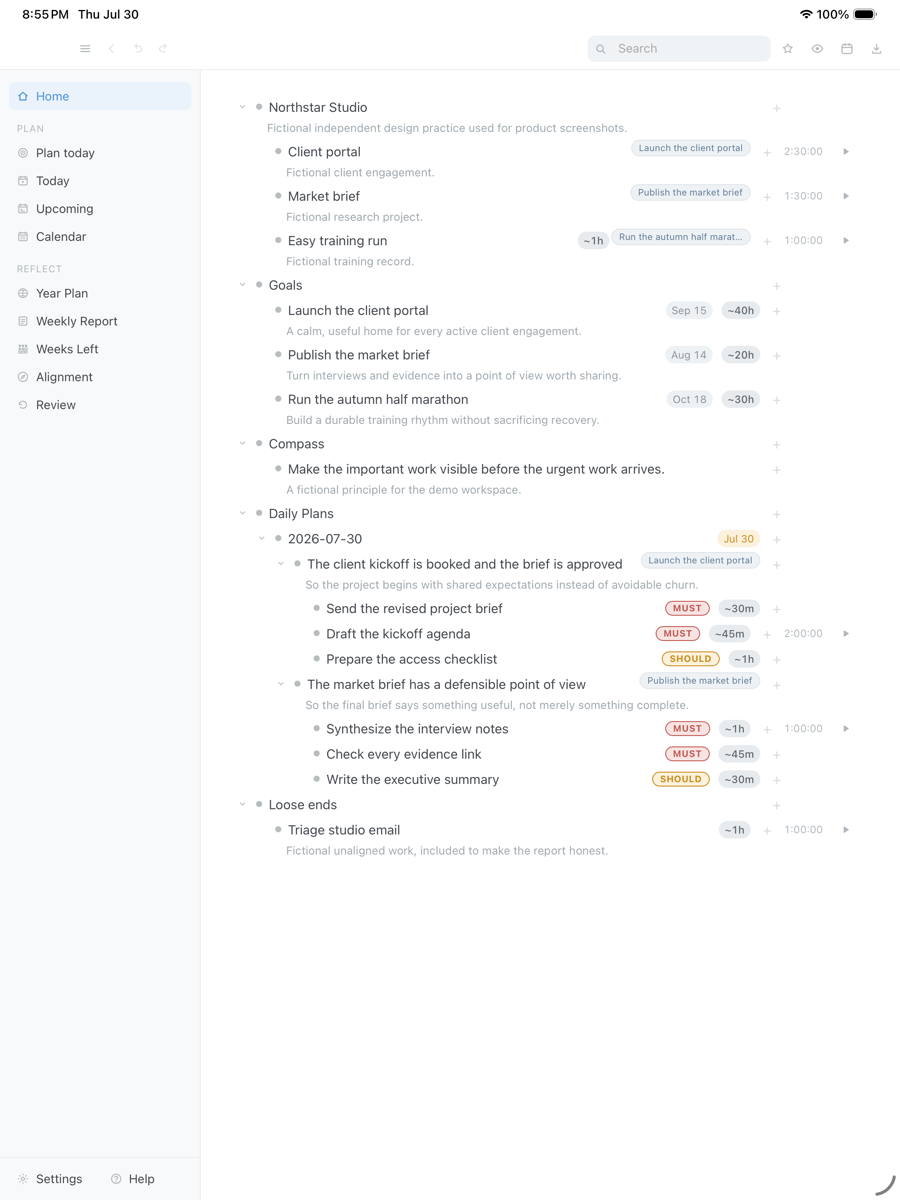
Drag the capture sideways to see the rest. Open full size
The part nobody asks until it is too late
What happens to a year of plans when the company goes away.
A rapid planning method app is where you write down what you want out of a year, so where that file lives matters more here than it does for a shopping list. Planning software has a short memory and a long list of shutdowns. The four below are matters of record, and they are why DayPrivate has no server to switch off.
Shut down on 27 March 2026 after its acquisition by Salesforce, with user data deleted.
Removed its free tier and left users unable to reach their own data.
Retired on 13 July 2026, and the Goals data went with it, on a product with more than a million paying subscribers.
Its support channel went dark, yet its users kept everything, because it only ever synced through their own iCloud. No server to shut off means nothing to lose.
DayPrivate follows the last pattern deliberately. Your outline is a file on your disk. Sync, if you turn it on, writes encrypted change sets into your own iCloud Drive under a passphrase only you hold. There is no account to close and no company database holding your year. If this project stopped tomorrow, the copy on your machine would keep opening. DayPrivate's privacy policy states the same thing in the terms that bind it.
Straight answers
When DayPrivate is the wrong rapid planning method app for you.
Four cases where another rapid planning method app, or a paper RPM block, will serve you better than DayPrivate. They sit above the price rather than below it on purpose.
- You need Windows or Android. DayPrivate is Mac, iPad and iPhone only, and there is no browser version planned.
- You want your team in it. There are no shared boards, no assignees and no comments. It is built for one person's day.
- You want the app to plan for you. It will not auto schedule your week from a priority score. It asks you to decide, then holds you to what you decided.
- You want to be productive in five minutes. The outliner is quick to learn. Running the full method, with outcomes and purposes and a weekly review, is a habit rather than a setting.
Price
What a rapid planning method app costs.
DayPrivate costs eight dollars a month, or sixty nine dollars a year. That is one plan with everything in it, on every device you own, with no free tier planned. If the plan lapses, the last version you paid for keeps working, and your outline and exports stay yours. See what the plan includes.
The official RPM software and planners are a separate purchase from a separate company. They are sold by Robbins Research International, which sets and changes its own prices, so read the number off their store rather than off a third party page like this one. DayPrivate quotes only its own price here, because that is the only one it can keep current.
One message, then nothing
Hear when the build is ready.
One email when DayPrivate is ready to install, and nothing else. No drip sequence and no newsletter.
Your address is used for that one message and nothing else.
Questions
Questions people ask about rapid planning method apps.
What is the Tony Robbins rapid planning method?
The rapid planning method, or RPM, is Tony Robbins' planning system built on three questions asked in a fixed order: what is the result you want, why do you want it, and what is the massive action plan that gets you there. The initials also read as result oriented, purpose driven, massive action plan. Around those three sit capture, where you empty everything you are carrying onto one page, and chunking, where the loose items serving one result get grouped under it as a single block. DayPrivate stores a day in exactly that shape rather than asking you to keep it in your head.
How much does rapid planning method software cost?
DayPrivate costs eight dollars a month or sixty nine dollars a year, one plan with everything in it on every device you own. The official RPM software and planners are sold separately by Robbins Research International at prices that company sets and changes, so check its own store for the current figure rather than trusting a number quoted on someone else's page.
What is the best app for planning a daily routine?
That depends which of four things you are actually shopping for: a bound paper planner, a printable page, a list app with dates on it, or a planner that owns your clock. DayPrivate's daily planner app page sorts those four apart and says plainly when paper is the better buy. This page is the narrower one, about running the rapid planning method itself.
Is this affiliated with Tony Robbins or Robbins Research International?
No. DayPrivate is an independent product, not affiliated with, endorsed by, or licensed by Robbins Research International. The method is referred to here only to describe how the app organises a day.
Do I have to plan this way to use DayPrivate?
No. Underneath the method, DayPrivate is a full outliner with the shortcuts, zoom and mirrors you would expect. Outcomes and purposes are there when you want the structure and out of the way when you do not.
Does it work without an internet connection?
Yes. DayPrivate runs against a local database on your device. There is no account and no server call in the normal running of the app.
Can I get my plans out?
DayPrivate exports the whole outline to OPML or plain text whenever you like. Settings shows you the exact path of the database file.
Is there an AI feature, and is it required?
DayPrivate has an optional session readout on the Mac app, and it is off until you install a model on your own machine. Nothing is sent anywhere. On iPhone and iPad, and without a model, the rest of the app is unchanged.
Is a paper RPM planner good enough?
Paper is genuinely good at the thinking part of the rapid planning method and genuinely bad at noticing. A paper RPM block cannot tell you that the block ended with two musts still open, or that the week went somewhere other than where you aimed it. That noticing is the part DayPrivate adds.
Rapid Planning Method and RPM are referred to descriptively on this page to explain a planning approach. All trademarks are the property of their respective owners.