DayPrivate / Logseq alternative
Mac, iPad, iPhone
A Logseq alternative is obvious once you name what you are leaving for.
Search this phrase and you get ranked lists. Five tools, nine tools, eleven tools, each list published by an app that would like to be your next one. They skip the step that actually shortens your shortlist, which is deciding which of the five things "Logseq alternative" can mean is yours. Markdown files in a folder you own is one requirement. Open source is a second. Linux and Android is a third. Plugins and queries is a fourth. And the fifth is the quiet one: your journal turned into a task list, and nothing in it has ever told you where the day went. DayPrivate answers the fifth, and this page is blunt about the four it does not answer.
The short answer
Pick your Logseq alternative by the requirement you are actually leaving for. Want the notes to stay plain markdown in a folder you own, or want open source, or need Linux, Windows or Android, or want the plugin and query ecosystem: DayPrivate is the wrong answer on all four, and a markdown native outliner is the right one. DayPrivate is for the fifth case. It is an outliner with infinite nesting, zoom, mirrors, links and backlinks, and a real clock attached to it: the day gets laid out on an hour grid around the meetings in your Apple Calendar, timers run on the bullets themselves, and when a block ends with a MUST still open one card asks whether to re-block it today, tomorrow, or leave it. DayPrivate costs $8 a month or $69 a year, one plan with everything in it, and the whole outline sits in a local database file that syncs end to end encrypted through your own iCloud Drive.
Three things to know before you read further. DayPrivate is Mac, iPad and iPhone only, with no Windows, Linux, Android or browser version. It stores a local database file rather than markdown files, and there is no Logseq importer, so an existing graph comes across by hand or not at all. And it is not publicly released yet, while Logseq is free to download today.
Definition
What is Logseq used for, and why people start looking for a Logseq alternative.
Logseq is an open source outliner for notes and tasks. It keeps its pages as plain text files on your own machine, gives every bullet an address so bullets can link to and embed each other, and opens on a page for today rather than on a blank document. People use it as a notebook that links itself. DayPrivate is built on the same outliner instincts and a different second half, and before that half makes any sense, here is what usually breaks first.
It links your thinking to itself
Nested bullets, links between them, and everything in one searchable graph. That part is genuinely good, and it is why leaving feels expensive enough to spend an evening searching for a replacement.
The journal becomes a task list
A page per day fills up with things you meant to do. Nothing in a journal has an opinion about an unfinished task, so it sits there, scrolls out of view, and is rediscovered three weeks later.
Where the hours actually went
A graph records what you wrote, not what the day did with you. There is no planned time, no tracked time, and no moment where the app compares the two. DayPrivate's whole second half is that comparison.
Worth noticing what sits at the top of this search, above every roundup: a thread on Logseq's own forum titled "Leaving Logseq - Alternative suggestions?". The people asking there are not asking for a feature list. They are asking which of their habits will survive the move, which is the question the rest of this DayPrivate page is organised around.
Five requirements, one phrase
Five things people mean by "Logseq alternative", and what each one should send you to.
Name yours before you read a single roundup. Four of these five point away from DayPrivate, and saying so here is cheaper for both of us than finding out after you have moved a year of notes.
The three ranked roundups fetched while writing this page offer five, nine and eleven candidates, and each one is published by a company selling one of the answers. That is not dishonest by itself. It is just a structure that can never tell you to leave. DayPrivate's list above tells you to leave four times out of five.
At a glance
DayPrivate beside the three shapes a Logseq alternative usually takes.
Columns are designs rather than named products, scored on how each design behaves as it ships. Individual apps beat their own category all the time, and a plugin can add almost anything to a tool that has plugins, which is exactly why the plugin row is in the table.
● full · ◐ partial · ○ absent
| Capability | DayPrivate | A markdown outliner over local files | A hosted workspace | A note app with a calendar |
|---|---|---|---|---|
| Keeping what Logseq gave you | ||||
| Notes stored as plain files you can open in any editor | ○absent | ●full | ○absent | ◐partial |
| Open source, readable and forkable | ○absent | ◐partial | ○absent | ○absent |
| Nested bullets, zoom, links and backlinks | ●full | ●full | ◐partial | ◐partial |
| One task that lives in several places and stays one task | ●full | ●full | ◐partial | ○absent |
| Plugins, themes and a query language | ○absent | ●full | ◐partial | ○absent |
| The half a graph does not have | ||||
| The day laid out on a real hour grid, around your meetings | ●full | ○absent | ◐partial | ●full |
| A timer on the bullet itself, one running at a time | ●full | ○absent | ◐partial | ○absent |
| Tracked time laid over planned time on the same grid | ●full | ○absent | ○absent | ○absent |
| Says something when a block ends with the work still open | ●full | ○absent | ○absent | ○absent |
| Getting there and getting out | ||||
| Opens the graph folder you already have | ○absent | ●full | ◐partial | ◐partial |
| Runs on Windows, Linux, Android or in a browser | ○absent | ●full | ●full | ◐partial |
| No account, no server, nothing measured | ●full | ●full | ○absent | ○absent |
| You can install it today | ○absent | ●full | ●full | ●full |
Read DayPrivate's column honestly and it has five absences in it, and they are the five that send most Logseq users somewhere else: no plain files, no source, no plugins, nothing outside Apple's platforms, and nothing to install yet. The four rows it owns are all on the same theme. A graph tells you what you wrote. DayPrivate tells you what the day did with the hours you had.
Whose move this is
The Logseq user DayPrivate is actually built for.
One shape of person, described plainly, so you can tell in about ten seconds whether you are it. Everyone else is better served by one of the four answers above.
Your graph is mostly a to do list wearing a notebook
The journals fill with tasks, the tasks outlive the day they were written on, and nothing ever raises a hand. DayPrivate keeps the outline and adds the missing half: an hour grid, a timer on the bullet, and a card at the end of a block that overran.
You plan in bullets but work against a calendar
Thinking happens in the outline and the day happens in Apple Calendar, so you retype one into the other. DayPrivate reads your calendar on all three devices and, from the Mac, mirrors your blocks back into a calendar you choose.
You never actually used the plugins
A lot of people install an outliner for the extensibility and then use nesting, links and search. If that is you, the ecosystem you are weighing up costs you nothing to leave, and the fixed feature set here is a smaller wall than it looks.
You are on a Mac and an iPhone, and that is the whole estate
DayPrivate is native on macOS, iPadOS and iOS, syncing encrypted through your own iCloud Drive with no account in the middle. If your machines are all Apple, the cross platform requirement that rules DayPrivate out for others does not apply to you.
Not for: anyone with a large graph they need to keep
There is no Logseq importer. A few pages can be pasted across, a decade of notes cannot, and pretending otherwise would cost you a weekend. Keep the graph where it reads and try DayPrivate on new work if you try it at all.
Not for: teams moving off Logseq together
DayPrivate holds one person's outline on one person's devices. No shared graphs, no assignees, no comments, no permissions, and none of it planned. A team needs a hosted workspace and the server that comes with it.
The move itself
Moving off Logseq into DayPrivate, artifact by artifact.
Every roundup on this search tells you which app to pick and goes quiet about the afternoon you spend actually moving. Here is the unflattering version for DayPrivate specifically, written from the app rather than guessed at. DayPrivate has no importer and nothing in it reads a graph folder.
Read that list and the sane conclusion for most Logseq graphs is: do not move it. Start DayPrivate on this week's work, keep the graph where it reads, and see in a fortnight whether the clock half earned its place. That is a worse sales pitch than "bring your whole graph across in one click" and a better description of what would actually happen.
The outliner half
What DayPrivate's outliner has, for someone arriving from Logseq.
A Logseq alternative that cannot outline is not an alternative at all, so the outliner comes first here and the planner sits on top of it. Plans, blocks and tracked time are ordinary bullets in the same document, which means they search, mirror, export and sync like everything else you have written.
The outline
The part you live in all day.
Infinite nesting and zoom
Click any bullet's dot and it becomes the whole page, with breadcrumbs back out. The zoom you left in is the zoom you return to.
Full keyboard outlining
Enter, Tab, Shift and Tab, move, complete, duplicate, delete a subtree, undo in bursts, bold, italic, underline.
Mirrors
One task that genuinely lives in several places. Edit, complete or time it anywhere and the original changes, so a plan can pull in work without copying it.
Links and backlinks
Type two brackets to link a bullet and see everything pointing at what you are reading. Links resolve to rows, not to page titles.
Notes on any bullet
Shift and Enter opens a note underneath, collapsed to its first line until you want the rest.
Search, tags and stars
Live filtering that keeps matches in context, project and area tags as pills, and starred views pinned in the sidebar.
Jump menu
Cmd and K fuzzy searches every bullet, and a greater than sign turns the same box into a command palette.
History and attachments
Up to fifty versions per bullet, restorable through the normal undo path, and files that live on the bullet they belong to.
The clock attached to it
The half a graph does not have.
Plan by outcome
Two or three outcomes for the day, each with the result you want by tonight and the purpose behind it, then actions marked MUST or SHOULD underneath.
Day and week grids
Twenty four hours in half hour slots, with fifteen minute snapping when you drag, move or resize. Drag a bullet on and the block takes its estimate.
Auto-block
The whole day in one press, around the events already in your calendar, inside your day start and day end, naming what did not fit instead of dropping it.
Timers on the bullets
Every bullet, plan row and block big enough to hold the control has a play button. One timer runs at a time, and it survives a crash.
The reckoning card
One card when a block ends with a MUST still open. Re-block today, tomorrow, or leave it, asked once, while you can still act on it.
The actual overlay
The time you really spent, laid beside the time you planned, on the same grid rather than in a separate report.
Calibration
Your estimates against your tracked time, so the thirty minutes you keep giving a ninety minute task becomes a number you have seen.
Where your data sits
One local database file whose path Settings shows you, encrypted sync through your own iCloud Drive, no account, no telemetry.
Two captures from the working DayPrivate build
Outcomes with a result and a purpose, actions marked MUST or SHOULD underneath, estimates on each one. This is what replaces a page per day. The projects and names in the capture are fictional.
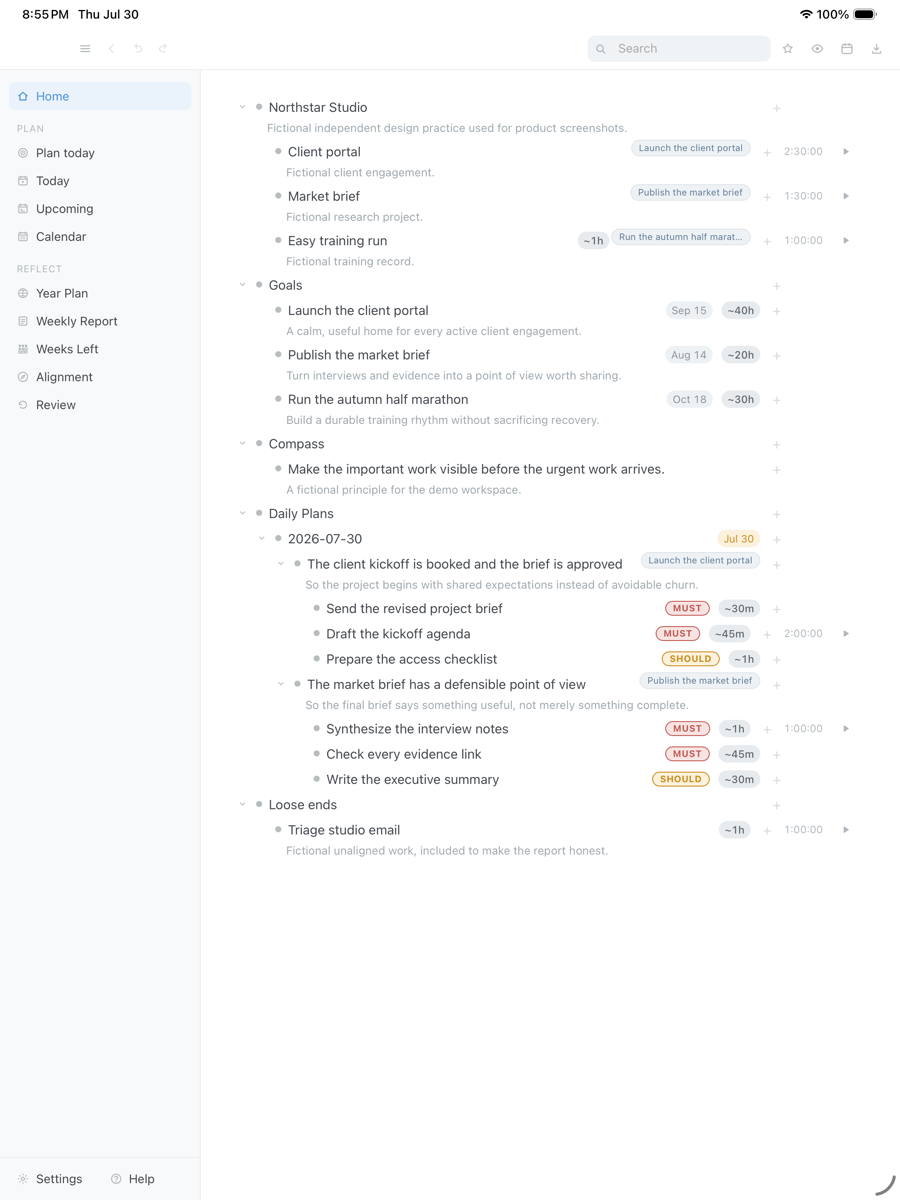
Drag the capture sideways to see the rest. Open full size
Seventy five minutes of MUSTs are still open when the block runs out, so DayPrivate asks once: re-block today, tomorrow, or leave it. A real capture rather than a mockup, with fictional work in it.
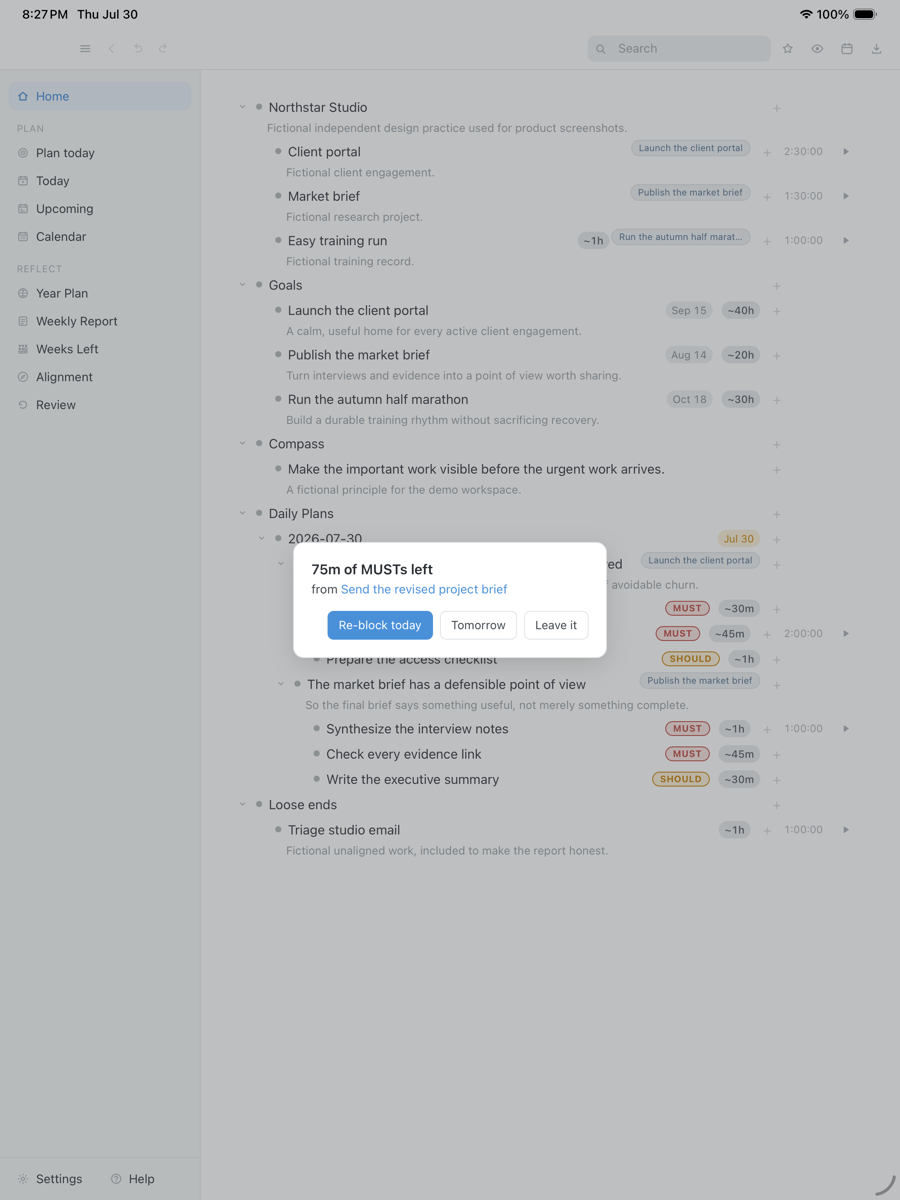
Drag the capture sideways to see the rest. Open full size
Both captures were taken on an iPad, from a build in daily use, seeded with fictional projects and goals. The Mac runs the same views.
If the grid is the half you came for, the time blocking app page goes through the rules auto-block follows and the five ways a blocked day comes apart. If you are comparing categories rather than outliners, start at the four kinds of day planner app instead.
The three comparisons people run next
Obsidian, Notion and AFFiNE, from a DayPrivate page with no stake in the answer.
These three come up in the same search session as "Logseq alternative", and DayPrivate is not in contention for any of them, which makes this the cheapest place to get a straight answer. No ratings, no verdicts, no feature scores: just the shape of each tool.
Which is better for me, Obsidian or Logseq?
Both keep plain text files in a folder you control, so the split is not privacy, it is the unit you think in. As they ship, Obsidian's unit is the page and a document stays a document. Logseq's unit is the bullet, every bullet is addressable, and the day's page is the front door. Write in paragraphs, take the document tool. Think in nested bullets that reference each other, take the outliner. Where DayPrivate sitsOn the outliner side, minus the plain files, plus an hour grid and a clock. If both of those tools already suit you, DayPrivate is not the upgrade. The full Obsidian vs Logseq comparison, with Sync prices and the 2026 Logseq split goes further.
What are the key differences between Logseq and Notion?
Three, before any feature list. Where the notes live: Logseq writes plain text files onto your disk, Notion keeps your workspace in its own hosted account. What the unit is: Logseq is an outliner where every bullet can be linked to, Notion builds structure from pages, tables, boards and properties. And who it is for: Notion is built for teams with sharing and permissions, Logseq for one person's graph. Where DayPrivate sitsFurther along the single person axis than Logseq: no account, no server, nothing measured, and no team features at all, now or later.
Which is better, AFFiNE or Logseq?
They are shaped for different kinds of thinking. AFFiNE is an open source workspace that puts documents and an edgeless canvas in the same app, so it suits arranging ideas spatially. Logseq is an outliner over plain text files, so it suits arranging ideas by nesting and linking. Both are open source and both move quickly, so check each one's current state yourself rather than trusting any roundup's snapshot, this one included. Where DayPrivate sitsNeither shape. It is a Mac, iPad and iPhone outliner with a day grid attached, closed source, $8 a month.
Is there an open source Logseq alternative?
Yes, several open source outliners and markdown note apps exist, and DayPrivate is not one of them. DayPrivate is closed source and paid. What it offers instead is the thing open source is usually wanted for here: no account, no server, no telemetry, a local file whose path the app shows you, and export to OPML, plain text, CSV and HTML. Be honest with yourselfIf you genuinely need to read or fork the code, that is a hard requirement and DayPrivate fails it. If what you wanted was nobody holding your notes, this clears that bar.
Straight answers
When DayPrivate is the wrong Logseq alternative.
- Your files have to stay markdown. DayPrivate keeps one local database file and exports to OPML, plain text, CSV and HTML. If editing the same notes in another editor tomorrow matters, this is the wrong app and no feature on this page changes it.
- You need the source. DayPrivate is closed source. The substitutes on offer are no server, no account, no telemetry and a readable export, which is not the same thing.
- You work on Linux, Windows or Android. Mac, iPad and iPhone only, with no browser version planned.
- Plugins or queries hold your graph together. Neither exists here, and neither is planned.
- You have a large graph to bring with you. There is no importer. Paste moves a page at a time and loses every link.
- You want a shared graph. One person, one set of devices. No assignees, no comments, no permissions.
- You want to install something today. Logseq is a download away. DayPrivate is in daily use by its author and not publicly released, so the form below is the only way in.
Price
DayPrivate costs eight dollars a month, or sixty nine a year.
One plan with everything in it, on every device you own, for one person. No team tier to be upsold to and no feature held back for a higher one. Logseq is free to download, so DayPrivate is asking you to pay for something you can already get for nothing, and the only honest reason to do that is the half a graph does not have: the hour grid, the timers on the bullets, and the card when a block ends with the work still open. If the plan lapses, the last version you paid for keeps working and your outline and your exports stay yours. See what the plan includes.
One message, then nothing
Hear when DayPrivate is ready.
One email when DayPrivate is ready to install, and nothing else. No drip sequence and no newsletter.
Your address is used for that one message and nothing else.
Questions
Logseq alternative questions worth asking before you move anything.
What is Logseq used for?
Logseq is an open source outliner for notes and tasks that keeps its pages as plain text files on your own machine, gives every bullet an address so bullets can link to and embed each other, and opens on a page for today rather than on a blank document. People use it as a notebook that links itself: meeting notes, reading notes, project outlines, and a daily journal that quietly fills with tasks. That last habit is what sends people searching, because a journal will hold an unfinished task forever without ever mentioning it again.
What is the best Logseq alternative?
There is no single best one, because the phrase covers five different requirements. Markdown files in a folder you own points at a markdown native outliner. Open source points at an open source outliner. Linux, Windows or Android rules out a large part of the shortlist including DayPrivate. Plugins and queries point at whichever app has the ecosystem. And a journal that became a task list with no sense of where the hours went points at DayPrivate: an outliner with a real clock attached, $8 a month or $69 a year, Mac, iPad and iPhone only.
Can I import my Logseq graph into DayPrivate?
No. DayPrivate has no importer, and nothing in it reads a graph folder. Pasting an indented block of text into a bullet does build real nesting, one level per tab or per two spaces, so a page at a time can come across by hand. Everything structural stays behind: bracketed links arrive as plain characters, block references have no equivalent, and assets are re-attached one at a time.
Does DayPrivate store notes as markdown files?
No. Everything sits in one local database file on your device, and Settings shows you its exact path. That is the trade against a folder of plain text: you lose editing the same notes in any other editor, and you gain mirrors, backlinks, timers, blocks and tracked time in one structure that stays consistent while three devices sync. The way out is export, to OPML, plain text, CSV or a self contained HTML report.
Does DayPrivate have journals or daily notes?
No, and the absence is the design. Instead of a page per day that fills with whatever you typed, DayPrivate opens the day as a plan: two or three outcomes, each with the result you want by tonight and the reason behind it, then actions underneath marked MUST or SHOULD. Those actions can be mirrors of tasks that already live elsewhere in your outline, so nothing is duplicated.
Does DayPrivate have plugins, queries or flashcards?
None of the three. No plugin API, no theme marketplace, no query language, no spaced repetition. If a graph is held together by queries you wrote or plugins you rely on, DayPrivate will feel narrow, because it is. What it ships instead is fixed: live search, tags as pills, starred views, a Cmd and K jump menu over every bullet, and a command palette behind a greater than sign.
Is DayPrivate a Logseq alternative for teams?
No. DayPrivate holds one person's outline on one person's devices. No shared graphs, no assignees, no comments, no permissions, and none of it planned. A team leaving together should look at a hosted workspace and accept the trade that comes with it: the notes move onto somebody else's server.
Is there a Windows, Linux or Android version of DayPrivate?
No. DayPrivate is a native macOS, iPadOS and iOS app, there is no browser version and there is no Apple Watch app. Logseq runs in places DayPrivate does not, so if your notes have to open on a Linux desktop or an Android phone, pick a cross platform tool.
How does sync work without an account?
Your devices write encrypted change sets into your own iCloud Drive under a passphrase you choose and enter on each device, and the passphrase never leaves the keychain. There is no DayPrivate server to hold anything, which also means there is nothing to log into and nothing to lose access to.
Is DayPrivate a WorkFlowy or Roam replacement instead?
The outliner is built in that tradition, with the nesting, zoom, mirrors and keyboard editing you would expect from it. The difference is the clock: the day grid, the timers on bullets, and the card at the end of a block. The product overview walks through the whole app, the daily planner page covers the older comparison, software against paper, and anyone leaving Roam itself has a page sorted by why people leave Roam.
What does DayPrivate cost, and can I install it today?
$8 a month or $69 a year, one plan, one person, every device they own. You cannot install it today: the build is in daily use and under active development, but it is not publicly released and it is not on the App Store. Logseq is free to download right now, and that gap is real rather than something this page will talk you out of.