DayPrivate / Obsidian vs Logseq
Two free note apps, compared from the outside
Obsidian vs Logseq is a choice between the page and the bullet.
Obsidian and Logseq both keep your notes on your own disk, both are free to download, and both link notes to each other with two square brackets. So the feature lists look alike, and the real difference hides in plain sight: Obsidian is built around the page, and Logseq is built around the bullet. This DayPrivate page lays out that difference, what each one costs once you add sync, what Logseq's 2026 split into two products means for anyone choosing it now, and what people who used both report in the threads that rank for this search. DayPrivate makes neither app and sells a third kind of tool, which is said once here and again near the end, where it belongs.
The short answer
Choose Obsidian if you write in paragraphs and want a fast, polished editor with a large plugin ecosystem. Choose Logseq if you think in nested bullets, want open source code, and like opening the app on today's journal. Both apps are free and keep notes on your own device, as markdown files in Obsidian and in Logseq OG, and in a local database in Logseq's newer database version.
- Best for writing and long notes: Obsidian. Free for personal and work use. Obsidian Sync is $4 a month billed annually, Publish $8 a month billed annually. Not open source.
- Best for outlining and a daily journal: Logseq. Free and open source under the AGPL. Its markdown version, now called Logseq OG, gets maintenance but no new features, and the database version is in beta.
- Best if your notes became a task list: DayPrivate. An outliner with an hour grid and timers, $8 a month or $69 a year, Mac, iPad and iPhone only, not publicly released yet.
Prices are from Obsidian's own pricing and Sync pages and Logseq's own posts, checked on 10 October 2026. Both apps change quickly, so check the current state yourself before moving years of notes.
The one difference
Obsidian thinks in pages, Logseq thinks in bullets.
Every other difference between Obsidian and Logseq follows from this one, so it is worth getting right before reading a feature table.
The page is the unit
You open a note and write a document in markdown. Obsidian's help defines a block as "a unit of text in your note", such as a paragraph or list item, and you link to one by adding a caret and an identifier. Blocks exist, but the note is what you navigate.
The bullet is the unit
Every line in Logseq is a block you can link to, embed, collapse or mark TODO. Logseq's docs start new users on the Journals page, so the daily page is where writing begins, and pages fill up from references to them.
Some end up using both
One member of the Mac Power Users thread that ranks for Obsidian vs Logseq uses Obsidian for long form writing projects and Logseq for information that is more short lived. A DEV Community writer settled on Logseq for the daily list and Obsidian for quick notes.
A quick test: open the last thing you wrote. If it reads as paragraphs under headings, you will feel at home in Obsidian. If it is a nest of short lines, several levels deep, Logseq will fit your hands. DayPrivate, for what it is worth, sits on the bullet side, which is why it is compared with outliners on the DayPrivate outliner app page.
Side by side
Obsidian vs Logseq feature by feature, with DayPrivate beside them.
Each Obsidian and Logseq cell comes from that app's own site, docs or GitHub page, as shipped without plugins. DayPrivate's column is written from the working build. A plugin can add almost anything to either note app, which is why the plugin row is in the table.
| Question | Obsidian | Logseq | DayPrivate |
|---|---|---|---|
| Price of the app | Free, including commercial use | Free | $8 a month or $69 a year |
| Open source | No | Yes, AGPL 3.0 | No |
| How notes are stored | Markdown files in a vault folder | Markdown or Org files in Logseq OG; a database in the new version | One local database file |
| Platforms | Windows, macOS, Linux, iOS, Android | Windows, macOS, Linux, iOS, Android | macOS, iPadOS, iOS |
| Official sync | Sync, from $4 a month billed annually | Sync in beta for Open Collective sponsors | Encrypted, through your own iCloud Drive |
| Publish notes as a website | Publish, $8 a month billed annually | Export public pages as a static site, desktop app only | No |
| Opens on a page for today | Daily notes core plugin | Yes, the Journals page | Today opens as a plan of outcomes |
| Links and backlinks | Yes | Yes | Yes, between bullets |
| Link to a single block | Yes, with a caret identifier | Yes, every bullet is a block | Links and mirrors point at bullets |
| Tasks built in | Markdown checkboxes | LATER, NOW, DONE by default, or TODO, DOING, DONE | MUST and SHOULD, with estimates |
| Queries or database views | Bases core plugin | Simple and advanced queries | No |
| Visual board | Canvas, in the open JSON Canvas format | Whiteboards | No |
| Flashcards | Through community plugins | Built in, tag a block with #card | No |
| PDF highlights | Through community plugins | Built in, on desktop | No |
| Community plugins | Large ecosystem | Smaller ecosystem | No plugin system |
| Tasks on an hour grid, with timers | No | No | Yes, the whole point |
Sources: obsidian.md pricing, Sync, license and download pages; Obsidian help on internal links, Bases and Canvas; Logseq's GitHub README and license; Logseq docs on flashcards, PDF highlights and the Journals page. The plugin row compares the two ecosystems as the forum threads on this search describe them, because neither company publishes a count on the pages checked for this DayPrivate comparison.
What it costs
How much Obsidian and Logseq cost once you add sync.
Both Obsidian and Logseq are free to download, so the real price question is what you pay to get the same notes onto a second device, or onto the web. These are the figures on each company's own pages, checked on 10 October 2026, next to DayPrivate's one plan.
| Plan | Price | What it buys |
|---|---|---|
| Obsidian app | Free | For personal and commercial use. The pricing page says a commercial license is not required. |
| Obsidian Sync Standard | $4 a month billed annually, $5 billed monthly | 1 GB, files up to 5 MB, one synced vault, one month of version history. |
| Obsidian Sync Plus | $8 a month billed annually, $10 billed monthly | 10 GB, upgradable to 100 GB, files up to 200 MB, ten vaults, twelve months of history. |
| Obsidian Publish | $8 a site a month billed annually, $10 billed monthly | Notes published as a website. |
| Obsidian Catalyst or commercial license | $25 once, or $50 a user a year | Optional ways to support the company. The core app is free without either. |
| Logseq app | Free | Open source under the AGPL 3.0, both Logseq OG and the database version. |
| Logseq Sync | $5 or $15 a month as a sponsor | Offered in beta through Open Collective sponsorship, per Logseq's 2024 Sync setup post, with a normal subscription promised for general launch. |
| DayPrivate | $8 a month or $69 a year | One plan with everything, encrypted sync through your own iCloud Drive included. Not on sale yet. |
Neither Obsidian nor Logseq forces a subscription on you. Obsidian and Logseq OG both keep plain files, so you can sync the folder with iCloud Drive, Git or another file sync tool and pay nothing, which is what several Mac Power Users members describe doing with Logseq before it had a sync of its own. The trade shows up on phones: the DEV Community writer on this search found mobile sync easiest with the paid Obsidian Sync.
Changed in 2026
Logseq split into Logseq OG and a database version, and that changes the Obsidian vs Logseq choice.
Most Obsidian vs Logseq comparisons were written before this, which is why it gets its own section on this DayPrivate page. In April 2026 Logseq announced it was splitting into two products.
In practice: if markdown files you can open in any editor are why you are comparing these two, the fair match for Obsidian is Logseq OG, and you are accepting a frozen feature set. If you want where Logseq is heading, you are accepting a beta. Neither is a reason to rule Logseq out. Both are reasons to keep backups.
From people who used both
What the Obsidian vs Logseq forum threads actually say.
Four of the pages ranking for Obsidian vs Logseq are forum threads or personal write ups rather than reviews. Their points repeat, so here they are grouped, with who said what.
Obsidian wins on feel and extension
A member of the Outliner Software forum put Obsidian ahead on "look and feel, speed and size of db, plugins, dataview, canvas, drawing". The DEV Community writer called it snappy with a rich plugin ecosystem.
Logseq wins on linked thinking
The same Outliner Software member said that for knowledge management features Logseq is "truly amazing", pointing at its linked and unlinked references under every page. Logseq's built in TODO markers make tasks work without a plugin.
Logseq's sore spots are sync and mobile
The DEV Community writer listed unstable sync, mobile frustrations and awkward future dated entries as what started bugging them about Logseq. Mac Power Users members describe the same sync trouble from the years before Logseq had its own.
Obsidian's sore spot is plugin dependence
In the Mac Power Users thread, one member warns that Logseq's smaller plugin library matters if you rely on plugins like Dataview. Read the other way, a vault built on a dozen plugins depends on a dozen maintainers.
Running both on one folder works
An Outliner Software member runs Obsidian and Logseq over the same markdown folder, with Logseq's timestamps turned off. That only applies to Logseq OG, because the database version does not write markdown files.
Logseq has no folders
Mac Power Users members note that Logseq does not organise pages into folders the way an Obsidian vault does, so people lean on index pages that link out to related notes instead.
Where DayPrivate fits
When neither Obsidian nor Logseq is the problem, and DayPrivate is the fix.
The DEV Community post on this search is titled "The Daily List Dilemma", and it is about a Logseq journal used as a to do list. That is the one situation where DayPrivate belongs in an Obsidian vs Logseq decision, and it is a narrow one.
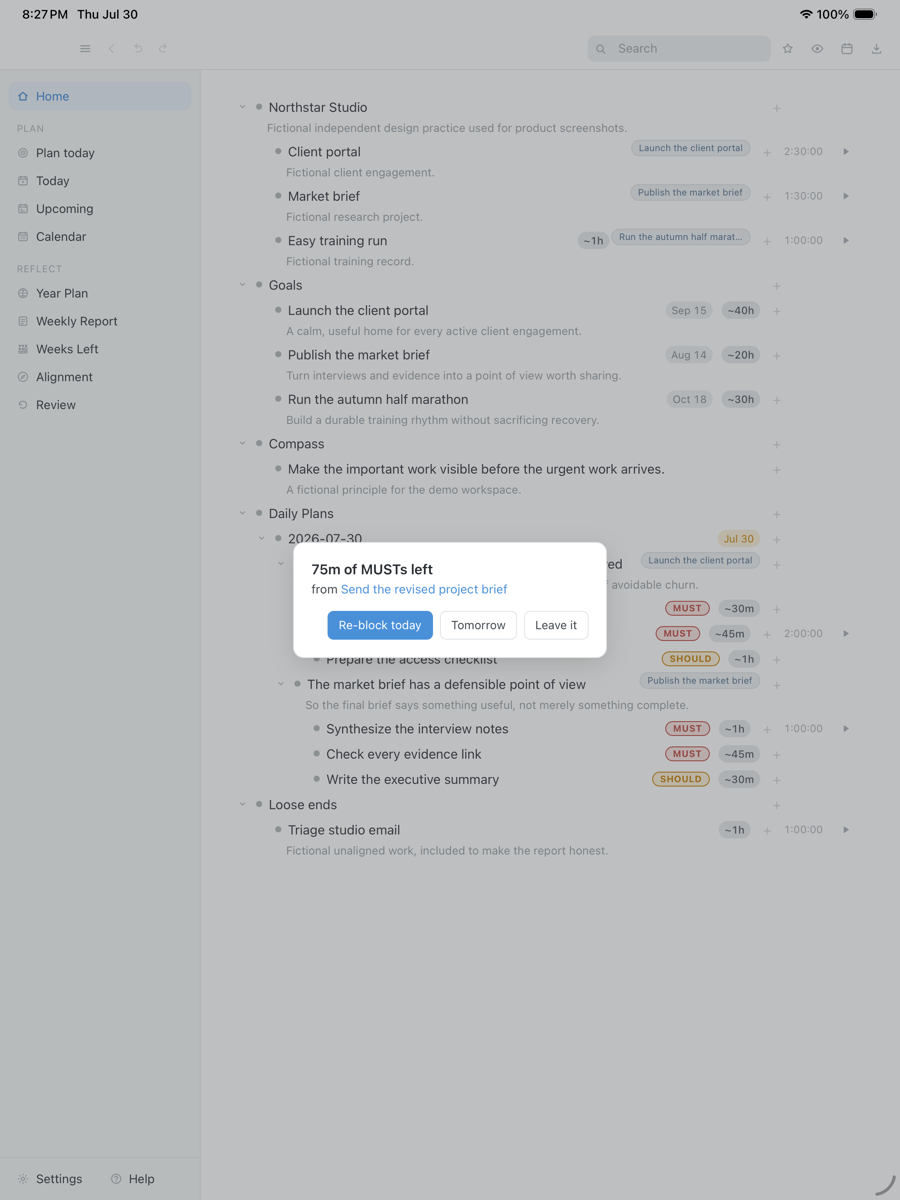
Obsidian and Logseq both record what you wrote. Neither puts a task on the hours of a real day, times it, or says anything when the time runs out with the task still open. DayPrivate keeps the outliner, with nesting, zoom, mirrors, links and backlinks, and adds that half. The day opens as two or three outcomes with actions marked MUST or SHOULD, the work goes onto an hour grid around your Apple Calendar, a timer runs on the bullet itself, and when a block ends with a MUST still open, one card asks whether to re-block it today, tomorrow, or leave it. The DayPrivate time blocking walkthrough covers the grid in detail.
Seventy five minutes of MUSTs are still open when the block runs out, so DayPrivate asks once: re-block today, tomorrow, or leave it. A real capture from the working build, with fictional work in it.
Drag the capture sideways to see the rest. Open full size
If you are already leaning towards leaving Logseq, the guide to picking a Logseq replacement by what you are leaving for sorts the options by requirement and says plainly which ones DayPrivate does not meet.
Straight answers
When DayPrivate is the wrong answer to Obsidian vs Logseq.
- You want markdown files. Obsidian and Logseq OG both give you that. DayPrivate keeps one local database file and exports OPML and plain text.
- You want free. Both note apps are free. DayPrivate is $8 a month.
- You want open source. Logseq is AGPL. DayPrivate is closed source, like Obsidian.
- You use Windows, Linux or Android. Obsidian and Logseq run there. DayPrivate is Mac, iPad and iPhone only.
- You rely on plugins, queries, Canvas, flashcards or PDF highlights. DayPrivate has none of them.
- You want to install something today. Obsidian and Logseq are a download away. DayPrivate is in daily use by its author and not publicly released.
Price
DayPrivate costs eight dollars a month, or sixty nine a year.
DayPrivate is one plan with everything in it, on every Apple device you own, for one person, with encrypted sync through your own iCloud Drive included. That is the same as Obsidian Sync Plus billed annually, for a different job: Obsidian Sync moves your notes, DayPrivate plans your day. If the plan lapses, the last version you paid for keeps working and your outline and exports stay yours. See what the DayPrivate plan includes.
One message, then nothing
Hear when DayPrivate is ready.
One email when DayPrivate is ready to install, and nothing else. No drip sequence and no newsletter.
Your address is used for that one message and nothing else.
Questions
Obsidian vs Logseq questions, answered by DayPrivate.
Is Obsidian better than Logseq?
Neither is better across the board, because they are built around different units. Obsidian is page first: you write documents in markdown, and its own help defines a block as a paragraph, quote or list item you can link to with a caret. Logseq is bullet first: every line is a block, and the daily journal is the page you write into. Pick Obsidian for long writing, a large plugin ecosystem and a polished editor. Pick Logseq for outlining, open source code and built in tasks, queries, flashcards and PDF highlights. DayPrivate is neither: it is an outliner with an hour grid and timers attached, for people whose notes turned into a to do list.
Is Obsidian free for commercial use?
Yes. Obsidian's license page says the app is free for personal and commercial use, and its pricing page says you are not required to buy a commercial license. The optional commercial license is $50 per user per year, and the one time Catalyst supporter license is $25. Logseq is free for any use too, under the AGPL 3.0 open source license. DayPrivate is a paid app at $8 a month or $69 a year.
How much does Obsidian Sync cost compared with Logseq Sync?
Obsidian Sync Standard is $4 a month billed annually or $5 billed monthly, for 1 GB, one synced vault and one month of version history. Sync Plus is $8 a month billed annually or $10 billed monthly, for 10 GB, ten vaults and twelve months of history. Logseq Sync was offered in beta to Open Collective sponsors at $5 or $15 a month, and Logseq's 2024 setup post says a normal subscription comes only when Sync launches to the general public. Many people sync either app's folder with iCloud, Git or another file sync tool instead. DayPrivate syncs through your own iCloud Drive at no extra cost on top of its $8 a month.
What is the downside of Obsidian?
Obsidian is not open source, and its release repository on GitHub says so in its first line. Syncing between devices is either a paid Sync plan or a file sync tool you set up yourself, and one developer who compared both apps wrote that mobile sync is easiest with the paid service. Much of what people like about Obsidian comes from community plugins, so a setup can depend on code maintained by strangers. And because the unit is the page, outlining in nested bullets that link to each other takes more effort than in Logseq.
Is Logseq good?
Logseq is good at what it was built for: outlining in linked bullets, a daily journal, tasks marked TODO and DONE, queries over your graph, flashcards and PDF highlights, all open source under the AGPL. The complaints in the forum threads that rank for Obsidian vs Logseq are consistent: sync has been unreliable for some users, the mobile app lags the desktop, and the file version stopped getting new features in 2026 when Logseq split into Logseq OG and a database version that is still in beta. Good, then, with a moving target underneath it.
What is a good alternative to Obsidian?
The answer depends on what you want that Obsidian lacks. If it is open source with notes on your own disk, Logseq is the closest swap and can even read the same markdown folder. If it is bullets rather than pages, an outliner such as Logseq, WorkFlowy or Bike fits better. If it is a team workspace, a hosted tool fits better than any local app. And if your vault has become a task list that never tells you where the day went, DayPrivate is built for that one case, at $8 a month on Mac, iPad and iPhone.
Which is better, Obsidian or Roam?
Obsidian is free, stores markdown files on your own disk, and charges only for optional Sync and Publish. Roam Research is a hosted outliner with no free tier, at $15 a month or $165 a year on Roam's sign up screen in October 2026, with your graph on Roam's servers. Roam is closer to Logseq in shape, because both are bullet first with a daily note. If you want Roam's outliner on your own disk for free, Logseq is the usual pick. DayPrivate keeps the outliner on your own device too, at $8 a month, and adds an hour grid.
Can Obsidian and Logseq use the same folder?
Yes, with the file version, which Logseq now calls Logseq OG. Both apps read a folder of markdown files, and users on the Outliner Software forum report running both over one folder, with the tip of turning off Logseq's block timestamps so the files stay clean. Logseq's journals and bullets show up in Obsidian as ordinary markdown lists. The newer Logseq database version stores graphs in a database rather than markdown files, so it cannot share a folder this way.
Is Logseq still being developed?
Yes, but the work moved. In April 2026 Logseq announced it was splitting into Logseq OG for file based markdown graphs and Logseq for database graphs. Logseq OG keeps security fixes and dependency upgrades but gets no new features. The database version is where new work happens, and Logseq's own GitHub page calls it beta, with its new mobile app and real time sync in alpha and a warning that data loss is possible. Anyone choosing Logseq today is choosing between a stable version with a frozen feature set and a newer one that is not finished.
Do Obsidian and Logseq have mobile apps?
Both do. Obsidian lists native downloads for iOS, Android, Windows, macOS and Linux. Logseq has iOS and Android apps for its file version, and its database version has a new mobile app that started on iOS. In the threads that rank for this comparison, Logseq's mobile experience draws more complaints than Obsidian's. DayPrivate runs only on Mac, iPad and iPhone, with no Android, Windows or Linux version.
Where does DayPrivate fit if I am choosing between Obsidian and Logseq?
Only if what you actually need is a planner. Obsidian and Logseq both store what you wrote, and neither puts your tasks on the hours of the day or tracks how long they took. DayPrivate is an outliner with nesting, zoom, mirrors, links and backlinks, plus an hour grid around your Apple Calendar, a timer on each bullet, and one card when a time block ends with a MUST still open. It costs $8 a month or $69 a year, runs on Mac, iPad and iPhone only, stores a local database file rather than markdown, and is not publicly released yet.