DayPrivate / To do list app
Free, paid, or a planner instead
Every to do list app is good at capture. That is not the part that fails.
Search this phrase and you get two piles again. Store listings at the top, an App Store page and a Google Play page competing on star ratings, and underneath them the roundups: six apps here, seven there, several thousand words each, all answering the same question of which one to install. Then a Reddit thread where somebody asks for a simple one, which is a decent clue about how the last five went. None of those results asks the question that actually decides whether you are still using the app in six weeks: what happens on the day the list is longer than the day. DayPrivate is written by someone who builds the other kind of app, so weigh this accordingly.
The short answer on to do list apps
A to do list app is a capture tool. It is very good at getting something out of your head and into a place you will see it again, it syncs across your devices, and for a lot of people that is genuinely all they need. Its structural limit is that a list has no length. Forty items and six working hours look exactly the same on screen, so the app can never tell you today will not fit, and the overflow shows up as a quiet backlog you eventually stop opening. If capture is your whole problem, use the free list app already on your phone and stop shopping.
DayPrivate is the app built here, and it is not a to do list app in the usual sense. DayPrivate is an outliner with a real clock attached for Mac, iPad and iPhone: lists, plans, time blocks and tracked time are ordinary bullets in one document stored as a database file on your own disk. It costs eight dollars a month or sixty nine dollars a year for one plan with everything in it. DayPrivate is not free, no free tier is planned, and it is not publicly released yet, so if you need a to do list app on your phone this afternoon, one of the free ones named further down is the honest answer.
Before you install anything
One phrase, four different products. Work out which to do list app you are shopping for.
The roundups on this search rank six or seven apps against each other as though they were the same product. They are not. A built in list, a dedicated list app, a workspace and a planner solve different problems, and picking the wrong category is usually the real reason the last one lasted three weeks.
If you already know you want the fourth kind, the comparison you want is between planners, and DayPrivate's day planner app page covers that, including the parts DayPrivate does not do.
The question under the search
Free to do list apps, including Google Tasks, and why DayPrivate is not one.
Most people typing to do list app want to know whether they have to pay. You do not. Apple Reminders, Google Tasks and Microsoft To Do all come with an account you already have rather than being sold separately, and each will hold a few hundred items without complaining. Google Tasks in particular shows up in the side panel of Gmail and Google Calendar as well as in its own mobile app, which is why it is the free answer for anyone whose day already runs through Google. It is deliberately small: a list, a due date, a subtask, and nothing else. That is an advantage if you want to stop shopping and a ceiling if you were hoping for priorities or any sense of whether today's list fits today.
The dedicated list apps that rank for this phrase mostly run a free tier and charge for the parts you hit later, commonly reminders, calendar views, longer history, or how many lists you can keep. Those limits move, so read the vendor's own pricing page rather than a third party page like this one before you commit a year of tasks to one.
DayPrivate is not one of the free ones. DayPrivate is eight dollars a month or sixty nine dollars a year, one plan with everything in it, and there is no free tier planned. The reason is what DayPrivate does not do: there is no account and no company server holding your outline, so there is no user data to sell and nothing to fund a free tier with. If free is the requirement, take one of the free options above and come back if it stops holding your day.
Two searches, one phrase
Making a list and running a day are different jobs, and a to do list app only does the first one.
If the job is genuinely to make a list, the smallest app that syncs to your other devices wins, and that is almost always the built in one. Every app on this search does capture well. Typing "call the accountant Friday" and having it land on Friday is a solved problem and has been for years, and no roundup is going to separate seven apps on that.
The unsolved half arrives about three weeks in. The list now has forty items on it. Eleven of them say today. The day has six working hours and two meetings already booked into it. A list app renders those forty items in the same amount of screen whether they need one hour or nineteen, because a list is an ordering and not a measurement. So it cannot tell you the thing you most need to know, which is that today already does not fit and something has to go. DayPrivate is built for that second job. It asks for a time estimate on the work and puts the work on real hours, which is the only way an app can show you the mismatch instead of leaving you to feel it at 16:00.
The verb the roundups skip
Tracking a daily to do list is not the same as ticking it, and DayPrivate keeps the receipt.
People searching for an app to track a daily to do list usually mean something more than a checkbox. A tick records that something finished. It does not record when it started, how long it took, or what it pushed out of the day. That gap is why the same week can feel productive and busy at the same time, and why most people cannot say on Friday where Tuesday went.
DayPrivate runs one timer at a time on any bullet, plan row, or block. One, deliberately, because two running timers is a lie about a single human attention. The running entry survives a crash. Estimated time sits next to tracked time on the same row, so the difference between what you thought a task would take and what it took is a number you can look at rather than a feeling. The weekly review is derived from that tracked time and never asks you to rate your week out of ten.
Putting the tracked work back onto real hours is time blocking, and DayPrivate's time blocking software page walks through that step on its own, including the six ways it usually goes wrong.
The honest half of the comparison
What a to do list app is genuinely better at, and the five places a list comes apart.
Both sides of this are worth saying out loud, including the side that costs a planner a sale. A list app is not a worse tool. It is a different one, and it fails in a specific place.
What a list app does better
And DayPrivate does not try to beat any of these.
- Capture speed. A widget, a share sheet and a text box that parses "next Tuesday at 9". Getting a thought in under two seconds is the whole craft of the category and it is genuinely well made.
- Being everywhere. Windows, Android, browser, watch, car. If your day crosses platforms, a cross platform list app is the only thing that follows you.
- Shared lists. Groceries with a partner, a handover with a colleague. Two people on one list is common, useful, and something DayPrivate has no answer for.
- Recurring commitments. Bins on Thursday, invoices on the first. A repeating task that comes back without being retyped is exactly what a list app is for.
- Starting. Install, type, done. No method to learn and no morning routine to adopt.
Where a list stops
The five failures that show up around week three.
- It has no length. Forty items and six hours look identical on screen. Nothing in a list app knows how long its own contents take, so it can never say today does not fit.
- Everything can be important. Four priority levels with no cap means every task drifts to P1 within a month, and a list where everything is critical has no priority in it at all.
- It cannot see your calendar. The meetings that actually eat the day live in another app, so your intentions and your real constraints never sit on the same surface.
- Overdue accumulates in silence. Yesterday's unfinished work rolls forward on its own, and after a fortnight the today view is a monument you stop opening rather than a plan.
- It records intent, not outcome. A tick tells you something happened. It never tells you the important thing went untouched while you cleared eleven small ones, which is the week most people actually had.
The part the roundups skip
How to actually run a to do list, whichever app you picked.
The long guides for this phrase run to thousands of words about which app to install and almost none about the routine that makes any of them work. The routine is the same in Apple Reminders, in Todoist and in DayPrivate. It is four moves, and they cost about ten minutes a day.
Keep one inbox, not five
Everything lands in one place, including the things that arrive by email and in meetings. A task in three apps is a task you will do zero or three times. This is the move a free built in list app already handles perfectly well.
Choose today before you sort it
Name what today owes you first: two or three outcomes with an actual finished result attached. Then pull the actions under them. A today list built by dragging whatever the app surfaced first is a pile, not a plan.
Give every item a number of minutes
This is the step almost nobody does and the step that changes the outcome. Estimate each item and add it up against the hours you actually have. Nearly every overloaded day is visible right here, in about ninety seconds, before it has cost you anything.
Close the day on purpose
Decide what happens to the unfinished items rather than letting them roll over on their own. In DayPrivate a carry tray offers yesterday's work forward one day at a time, so nothing accumulates behind your back and nothing disappears either.
Step two, naming a finished result and the reason it matters before writing the actions, is the rapid planning method, and DayPrivate's rapid planning method app page covers how that is built into the outline itself.
Where this one fits
DayPrivate is what you move to when the to do list app stopped being the problem.
DayPrivate is an outliner first. Your lists, your plans, your blocks and your tracked time are ordinary bullets in one document you can zoom, mirror, search and export. The planner sits on top of that rather than beside it.
You name two or three outcomes for the day, each with the result you want by tonight and your reason for it, then mark the actions underneath MUST or SHOULD. Two flags, not four, and the rollup shows the must total separately, so the day either fits or visibly does not. Auto-block lays the work on the grid in one press, around the calendar you already keep and inside your day start and day end, and it names what did not fit instead of quietly dropping it to tomorrow.
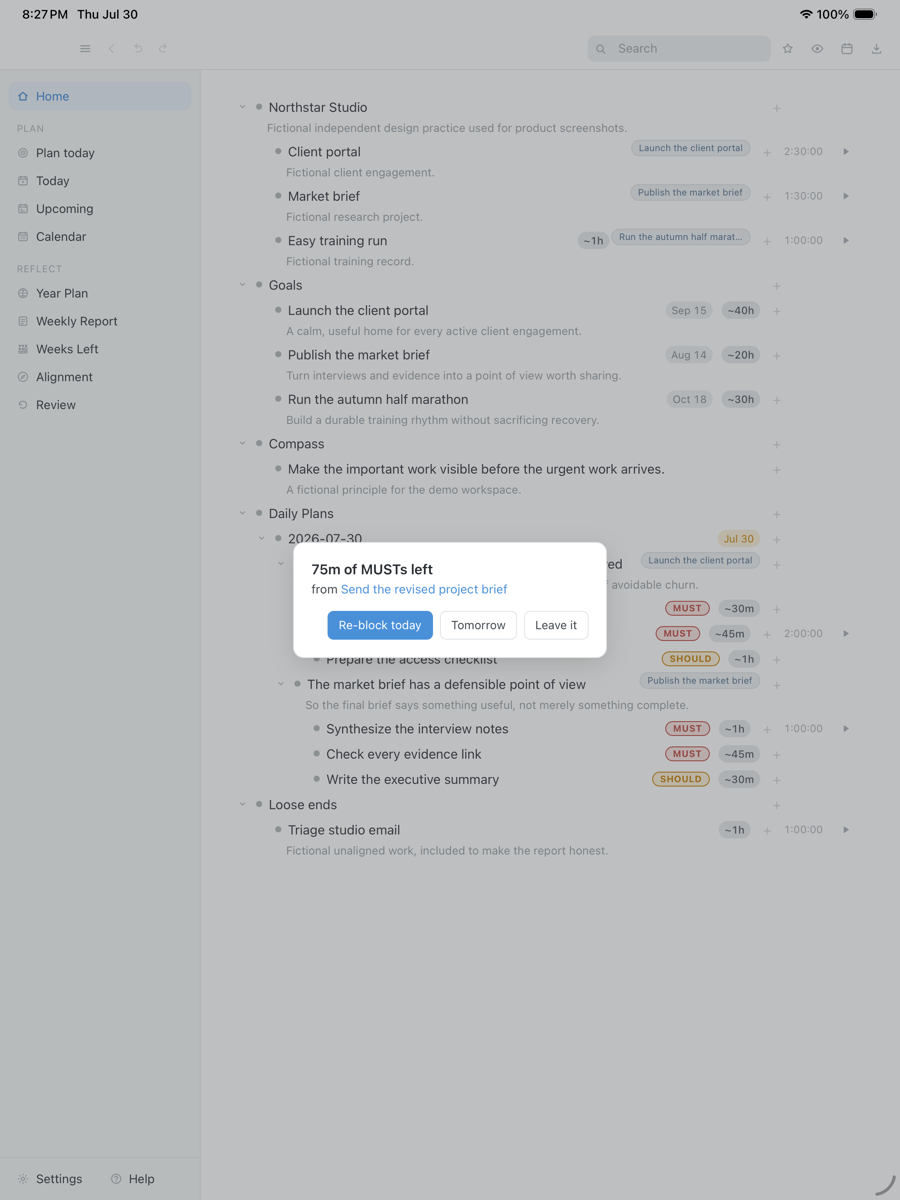
Then the part a list cannot do. When a block ends with a MUST still open, one card appears while you can still act on it, offering re-block today, re-block tomorrow, or leave it. Dismissing it counts as a decision, so it never asks twice about the same ending. That is the opposite of an overdue count going up on its own: DayPrivate makes you spend a second on each item that did not happen, once, on the day it did not happen.
A DayPrivate block ending with work still open, asking once what should happen to it, with fictional tasks in an isolated demo database.
Drag the capture sideways to see the rest. Open full size
Next morning, yesterday's list read back to you
DayPrivate runs on Mac, iPad and iPhone. There is no browser version, no Windows or Android build, and no watch app. A few surfaces are macOS only, including mirroring your blocks back into Apple Calendar, the menu bar timer, quick capture, and the optional local AI features. The full platform table is on the day planner app page.
The question the store listings never raise
What happens to your list when the to do list app goes away.
Two of the top results for this phrase are store listings, and a store listing has no reason to discuss this. It is worth a minute anyway, because you are about to hand something a few years of your commitments.
Retired on 13 July 2026, and the Goals data went with it, on a product with more than a million paying subscribers.
Shut down on 27 March 2026 after its acquisition by Salesforce, with user data deleted.
Removed its free tier and left users unable to reach their own data.
Its support channel went dark, yet its users kept everything, because it only ever synced through their own iCloud. No server to shut off means nothing to lose.
DayPrivate follows the last pattern deliberately. Your outline is a database file on your own disk, and Settings shows you its exact path. Sync, if you turn it on, writes encrypted change sets into your own iCloud Drive under a passphrase held in your device keychain, which nobody else can read, including this app's author. There is no account and no company database holding your tasks. Export to OPML, plain text, CSV or a self contained HTML report at any time. If this project stopped tomorrow, the copy on your machine would keep opening.
The whole accounting, including the calendars and the optional local AI features, is in the privacy section of the overview.
Straight answers
When a plain to do list app is the better call and DayPrivate is not.
- You want something on your phone this afternoon. Use the free list app already on it. DayPrivate is in daily use and under active development, but it is not publicly released and it is not on the App Store yet.
- You want a free app. DayPrivate is eight dollars a month or sixty nine a year, and there is no free tier planned. Apple Reminders, Google Tasks and Microsoft To Do cost nothing with an account you already have.
- Your day happens on Windows or Android. DayPrivate is Mac, iPad and iPhone only, with no browser version planned and no watch app. A cross platform list app is the right answer.
- You need shared lists. No shared boards, no assignees, no comments, and none of that is planned. Groceries with a partner is a job for a list app.
- Capture speed is the whole requirement. The dedicated list apps have spent years on quick add parsing and widgets. If typing a task in two seconds from a lock screen is what you are shopping for, buy that.
- You want the app to decide the day. Auto-block lays out a day you have already chosen. DayPrivate will not rank your work for you or infer what today is about from a priority score.
Price
DayPrivate is eight dollars a month, or sixty nine a year.
One plan with everything in it, on every device you own, for one person. No team tier to be upsold to and no feature held back for a higher one, which is the opposite of how the free tiers on this search are usually shaped. If the DayPrivate plan lapses, the last version you paid for keeps working and your outline and exports stay yours. See what the plan includes.
One message, then nothing
Hear when the build is ready.
One email when DayPrivate is ready to install, and nothing else. No drip sequence and no newsletter.
Your address is used for that one message and nothing else.
Questions
The things worth asking about a to do list app.
What is the best free app for to do lists?
Usually the one already on the device you are holding. Apple Reminders on iPhone, iPad and Mac, Google Tasks inside Gmail and Google Calendar, and Microsoft To Do for a Microsoft account all come with the account rather than being sold separately, and each will hold a few hundred items without complaint. The dedicated list apps that rank for this phrase, including Todoist and TickTick, mostly run a free tier and charge for the parts you hit later, commonly reminders, calendar views, longer history, or how many lists you can keep, so check the current limits on the vendor's own pricing page before you commit a year of tasks to one. DayPrivate is not a free to do list app and no free tier is planned.
Is Google to do lists free?
Google Tasks comes with a Google account rather than being sold as a separate product, and it appears in the side panel of Gmail and Google Calendar as well as in its own mobile app. It is deliberately small: a list, a due date, a subtask, and nothing else. That is a real advantage if you want to stop shopping, and a real ceiling if you were hoping for priorities, time estimates or any sense of whether today's list fits today. Google publishes its own current terms, so check those rather than a third party page like this one.
What is the best app to use to make a list?
For making a list and nothing more, the smallest app that syncs to your other devices wins, and that is almost always the built in one. Making the list is the easy half and every app on this search does it well. The hard half is what happens on the day the list has forty items and the day has six working hours, because a list app has no way to tell you those two numbers do not match. DayPrivate is built for that second half rather than the first, which is why this page recommends a free built in list app to anyone whose only job is capture.
What is the best app to track my daily to-do list?
Tracking is a different verb from listing, and most to do list apps do not do it. Ticking a box records that something finished, not when it started, how long it took, or what it displaced. If you want the after picture, you need an app that keeps a timer next to the task and shows the week back to you. DayPrivate runs one timer at a time on any bullet, plan row, or block, survives a crash without losing the running entry, and builds the weekly review out of that tracked time rather than asking you to rate your week.
What is the difference between a to do list app and a day planner?
A to do list app records what you would like to do. A day planner commits it to a time, which is what forces the decision about what will not happen today. Everything else is packaging. It is also why planners feel harder than lists: the list lets you keep every intention, and the planner makes you drop some. DayPrivate's daily planner app page compares that side of the category, paper included.
Is DayPrivate a to do list app?
Not in the way this search usually means. DayPrivate is an outliner with a clock attached, and a list is one of the things you can keep in it, alongside plans, time blocks and tracked time as ordinary bullets in the same document. If what you want is fast capture, shared lists with your household, and a widget, a dedicated list app will suit you better. DayPrivate is for the point where the list is not the problem any more and the day is.
Does DayPrivate work without an internet connection?
Yes. Everything runs against a local database file on your device. There is no account and no server call in the normal running of the app, so a plane, a tunnel, or a bad hotel connection changes nothing about your list.
Can I get my tasks out again if I stop using the app?
Yes. Export the whole outline to OPML, plain text, CSV, or a self contained HTML report whenever you like, and Settings shows you the exact path of the database file on your own disk. If a DayPrivate plan lapses, the last version you paid for keeps working and the file stays where it is.
How much does DayPrivate cost?
DayPrivate is eight dollars a month or sixty nine dollars a year. That is one plan with everything in it, on every device you own, for one person. There is no team tier and no feature held back for a higher one.
Can I try DayPrivate today?
Not yet. The build is in daily use and under active development, but it is not publicly released and it is not on the App Store. If you need a to do list app on your phone this afternoon, use the free one that is already there. The form above is how you hear when there is something to install, and the product overview walks through the whole app.