DayPrivate / Time blocking app / Best time blocking apps
Best time blocking apps, 2026
The best time blocking app depends on who you want drawing the blocks.
Some time blocking apps build the day for you. Some walk you through building it yourself. Some are a calendar you draw on by hand. Pick the wrong kind and the best app on any list still ends up unopened by the second week. Here are nine time blocking apps and DayPrivate, sorted by the job each one does, with the price each vendor lists today.
The short answer
The best time blocking app for you, in one paragraph.
The best time blocking app depends on who places the blocks. If you want software to build and rebuild the day, Motion lists Pro AI at $19 per seat a month, Reclaim has a free Lite plan, and Morgen lists $30 a month or $15 a month billed yearly, with apps for Windows, macOS, Linux, mobile and the browser. If you want a guided daily ritual, Sunsama lists $22 a month or $17 a month billed yearly. If you want it free, Structured's free version and TickTick Free go a long way, though TickTick keeps task duration on Premium at US$49.99 a year. Every figure was read off the vendor's own pricing page or US App Store listing on 23 October 2026.
DayPrivate is the best time blocking app for one narrower case: you plan your own work on Mac, iPad and iPhone, you want to choose the day and have the app lay it out around your calendar, and you want one card when a block ends with a MUST still open. DayPrivate will be $8 a month or $69 a year. It is not released yet.
Best for
The best time blocking apps by job, with each vendor's own price.
Each row names one time blocking app, the job its own page says it is built for, and the price that page lists. DayPrivate gets a row too, and it is the right answer to exactly one of them.
How DayPrivate picked these time blocking apps
These labels are DayPrivate's reading of what each vendor's own page says its app is built for, not a hands on test of the other nine. Worth knowing when you read the other lists for this search: the roundups from Motion, FlowSavvy and Planyway are each published by an app in the category. The prices above are the part you can check, and each one links to its source in the table below.
Time blocking apps compared
Ten time blocking apps, DayPrivate included, side by side on price.
This table ranks nothing. It lists what each time blocking app's pricing page or US App Store listing showed on 23 October 2026, and who places the blocks in each design.
| App | Paid price, as listed | Free version | Who places the blocks |
|---|---|---|---|
| Motion | Pro AI $19 per seat a month (cadence not labelled), Business AI $29 | None listed, free trial | The app, with an AI task planner |
| Reclaim | Starter $12 per seat a month, or $10 billed yearly | Yes, Lite | The app, around focus time and habits |
| Morgen | $30 a month, or $15 a month billed yearly | No, 14-day trial | You, supported by an AI Planner |
| Sunsama | $22 a month, or $17 a month billed yearly | No free forever plan | You, through a guided daily ritual |
| Akiflow | $34 a month, or $19 a month billed yearly (promo) | No, 7-day trial with card | You, from a universal inbox |
| TickTick | Premium US$49.99 a year | Yes, 9 lists of 99 tasks | You, task duration on Premium |
| Structured | Pro $2.99 to $6.99 a month, $9.99 to $49.99 a year, $99.99 lifetime (App Store) | Yes | You on the free timeline; Pro offers AI day planning and automatic replanning |
| TimeBloc | In-app purchases from $4.99 to $99.99 (App Store) | Yes | You, on an iPhone timeline |
| Fantastical | Flexibits Premium, 14 day trial | Yes, Free tier | You, by hand on a calendar |
| DayPrivate | $8 a month or $69 a year | No, not released yet | You choose the day, Auto-block lays it out |
Source: each vendor's own page, read on 23 October 2026: Motion pricing, Reclaim pricing, Morgen pricing, Sunsama pricing, Akiflow pricing, TickTick Premium, the US App Store listings for Structured and TimeBloc, Flexibits Premium, and the DayPrivate plan. Structured and TimeBloc sell inside the app, so the App Store in-app purchase list is the figure here, and your country's store may differ. The vendor's page wins over this table.
How to choose
What makes the best time blocking app: four checks before the feature list.
Every time blocking app can draw a rectangle on a day. These four checks are what separate them, and each one is something you can try in your first hour with Motion, Sunsama or any of the rest. DayPrivate's answer to each is in the check itself.
Who places the blocks?
You by hand (Fantastical, Structured's free timeline, TimeBloc), the app by itself (Motion, Reclaim), or you stay in charge with the app's help (Morgen's AI Planner, Structured Pro's AI day planning, DayPrivate's Auto-block). Decide this first. It removes half the list.
What happens when a block ends unfinished?
Let one block run out with the task unchecked and watch the time blocking app. Silence means the plan quietly stops matching the day. DayPrivate shows one card offering re-block today, tomorrow, or leave it.
Does a block carry an estimate?
A block needs a length before it lands on the grid. TickTick keeps task duration on Premium. In DayPrivate you type a tilde on a bullet to set its estimate, and the block takes it.
Does it run on every device you plan on?
Morgen lists Windows, macOS, Linux, mobile and browser. TimeBloc is listed Only for iPhone. DayPrivate is Mac, iPad and iPhone, with no Windows, Android or web build.
Free time blocking apps
Is there a free time blocking app that is actually enough?
Yes, for hand drawn blocks. Structured's free version, listed free with in-app purchases on the US App Store, gives you a visual timeline on iPhone, iPad, Mac and Apple Watch. Fantastical has a Free tier, and Flexibits lists Fantastical on Mac, iPhone, iPad and Windows. Reclaim Lite is the free option if you want the app to place focus time for you, limited to a one week scheduling range and one calendar sync on its pricing page. And the calendar you already have, Apple Calendar or Google Calendar, will hold a time block as well as any app, for free.
Free runs out at the same two places in most time blocking apps: the block carrying an estimate, and anything happening after the block ends. TickTick Free, for example, covers 9 lists of 99 tasks but puts task duration and multiple calendar views on Premium at US$49.99 a year. DayPrivate has no free plan: it will be $8 a month or $69 a year, one plan with everything in it.
By device
The best time blocking app for iPhone, Mac, Windows and Android.
Device support cuts most time blocking app shortlists in half, so here is what each listing says, device by device.
Best time blocking app for iPhone
TimeBloc is built for the iPhone and listed Only for iPhone, iOS 16.0 or later. Structured needs iOS 18.0 or later and also runs on iPad, Mac and Apple Watch. DayPrivate runs the same grid on iPhone, iPad and Mac, but is not on the App Store yet.
Best time blocking app for Mac
On the Mac, Structured needs macOS 15.0 or later and Fantastical is a native calendar. DayPrivate does most on the Mac: the running block in the menu bar and blocks mirrored back into Apple Calendar. The DayPrivate time blocking app for Mac page walks through each surface.
Best time blocking app for Windows
Morgen's pricing page lists apps for Windows, macOS and Linux, which makes it the cross platform pick here. Fantastical also lists Windows. DayPrivate has no Windows or Linux build and none is promised.
Best time blocking app for Android
Motion's pricing page lists an Android app, Morgen lists mobile apps, and TickTick lists cross-platform sync on its Free plan. DayPrivate has no Android build, so if your phone is Android, pick from those three.
Worked example
Worked example: one real day blocked by DayPrivate's Auto-block.
A time blocking app list is easier to judge when you can see one of the apps make a call. Here is DayPrivate's Auto-block on an ordinary day with two meetings and five things to do, planned the evening before.
- Set the window. Day start 09:00 and day end 18:00, which are DayPrivate's defaults, and a gap between blocks of 15 minutes. The gap setting offers None, 5, 10, 15 or 30 minutes.
- Let the calendar in. Apple Calendar already holds two meetings, 10:00 to 11:00 and 14:00 to 15:00. That leaves 420 free minutes in a 540 minute day.
- List the work with estimates. Draft the client proposal, MUST, 90 minutes. Review the contract redlines, MUST, 45 minutes. Write the talk outline, SHOULD, 120 minutes. Send three invoices, SHOULD, 30 minutes. Rework the pricing page, SHOULD, 90 minutes. That is 375 minutes of estimates.
- Press Auto-block once. MUSTs go first. The proposal lands at 11:15 to 12:45, because 90 minutes plus a 15 minute gap on each side does not fit before the 10:00 meeting. The contract review follows at 13:00 to 13:45.
- The SHOULDs fill what is left. The talk outline skips past the 14:00 meeting to 15:15 to 17:15, and the invoices take 17:30 to 18:00.
- One action is named, not squeezed. The 90 minute pricing page rework does not fit before 18:00, so Auto-block reports it as not placed instead of running past your day end.
Method: we ran DayPrivate's own Auto-block planning function on exactly these inputs on 23 October 2026, and the times above are what it returned. The projects are fictional.
Two things in that DayPrivate result are worth noticing. First, 375 minutes of work did not fit in 420 free minutes, because gaps and meeting edges eat time a total hides. Second, 09:00 to 09:45 stays empty: Auto-block walks forward through the day and does not go back to fill an earlier hole, so you drag the invoices there yourself if you want them. Auto-block's Undo removes exactly the blocks it made and leaves any you placed by hand.
Time blocking vs time tracking
What is better than Clockify? Usually a different kind of app.
Clockify shows up on best time blocking app lists, Motion's among them, but it is a time tracker: it records where the hours went, after the fact. Clockify's pricing page lists Standard, its timesheeting and billing plan, at $5.49 per seat a month billed annually or $6.99 billed monthly. If you bill clients by the hour and need invoices, approvals and timesheets, Clockify is doing the job you need and a time blocking app is not better.
If what you want is the hours decided before the day starts, you want a time blocking app, and the best ones also track. DayPrivate puts a timer on every block, lays the time you really spent beside the time you planned on the same grid, and reports tracked against planned time per task, project or area. It stops there: DayPrivate has no rates, no invoices and no approvals.
Where DayPrivate fits
DayPrivate among the best time blocking apps: what it does at the end of a block.
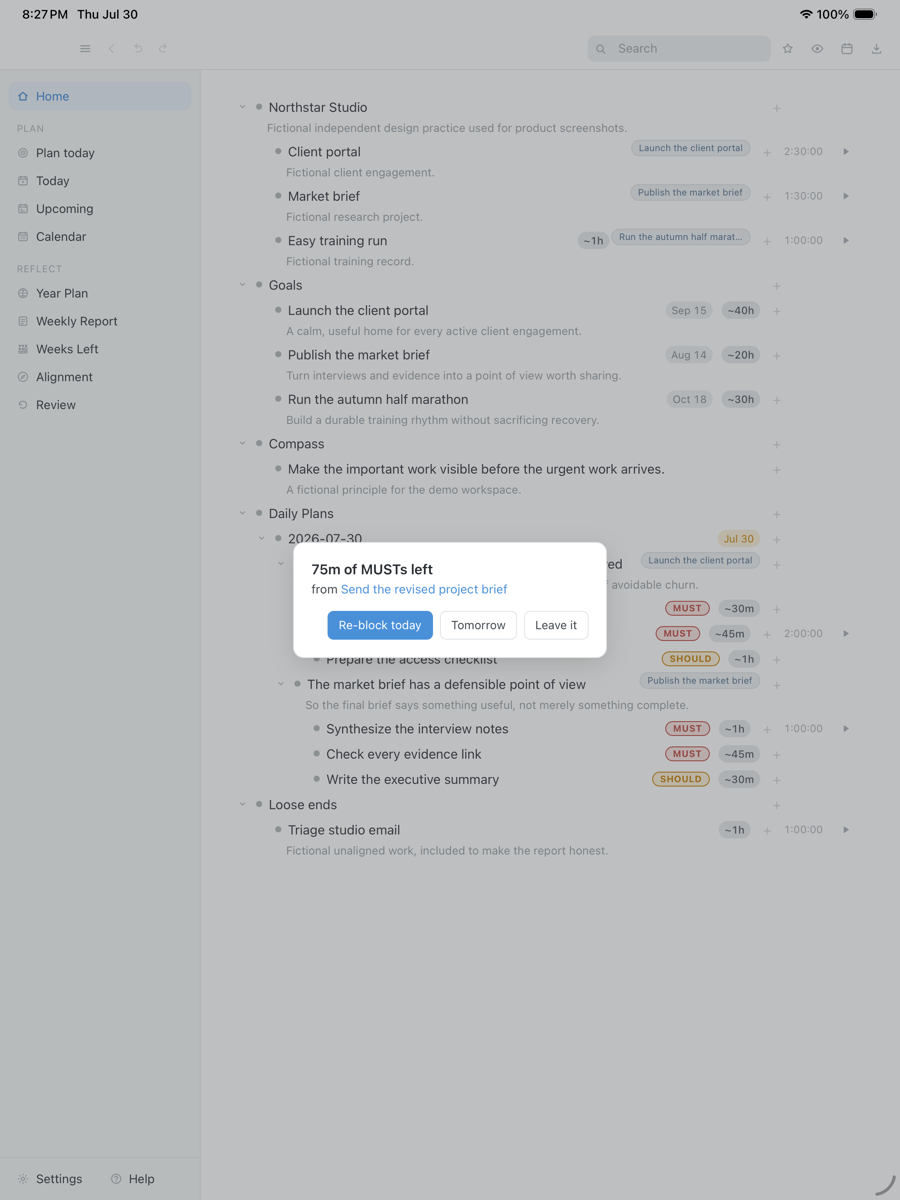
Most of the time blocking apps above are judged on how they place the blocks. DayPrivate is built around what happens after one ends. You name two or three outcomes for the day, mark the actions under them MUST or SHOULD, and Auto-block lays them around Apple Calendar on a twenty four hour grid in half hour slots, snapping to fifteen minutes. When a block ends with a MUST still open, one Reckoning card asks once: re-block today, re-block tomorrow, or leave it.
The plan is a local database file on your disk, with encrypted sync through your own iCloud Drive and no DayPrivate account. Every block is an ordinary bullet in a full outliner, so it searches and exports like the rest of your notes. For the full walkthrough, including the menu bar timer and calibration of your estimates, read how DayPrivate's time blocking software works.
A block ended with work still open, so DayPrivate asks once what should happen to it. Fictional tasks in an isolated demo database.
Drag the capture sideways to see the rest. Open full size
When another time blocking app beats DayPrivate
You want the software to decide the day: Motion or Reclaim. You plan on Windows, Linux, Android or in a browser: Morgen. You need tasks from Slack and email in one inbox: Akiflow, or see the Akiflow alternatives priced vendor by vendor. You want a free visual timeline: Structured. You need something you can install today: any of them. DayPrivate is Apple only, one person, no integrations inbox, and not released yet.
DayPrivate price
DayPrivate will be eight dollars a month, or sixty nine a year.
DayPrivate has one plan with everything in it, on every Apple device you own, for one person. No team tier. If the plan lapses, the last version you paid for keeps working and the file stays yours. Against the time blocking apps above, $8 a month sits under Sunsama's $22, Morgen's $30 and Akiflow's $34 monthly list prices, and over the free versions of Structured, TickTick and Reclaim. See what the DayPrivate plan includes. If you are still deciding between kinds of planner rather than kinds of blocking, the day planner app guide sorts them by how they fail.
One message, then nothing
Hear when the build is ready.
One email when DayPrivate is ready to install, and nothing else. No drip sequence and no newsletter.
Your address is used for that one message and nothing else.
Questions
Best time blocking app questions, answered about the category and about DayPrivate.
What is the best time blocking app?
There is no single best time blocking app, because they split on who places the blocks. For AI that builds the day, Motion lists Pro AI at $19 per seat a month and Reclaim has a free Lite plan. For Windows and Linux, Morgen lists $30 a month or $15 billed yearly. For a guided ritual, Sunsama lists $22 a month. For a free visual timeline, Structured. For one card when a block ends unfinished on Mac, iPad and iPhone, DayPrivate, at $8 a month once released. Prices checked on 23 October 2026.
Is there a free time blocking app?
Yes. Structured is free with in-app purchases on the US App Store, Fantastical has a Free tier, Reclaim Lite is free with a one week scheduling range and one calendar sync, and TickTick Free covers 9 lists of 99 tasks, though TickTick puts task duration on Premium at US$49.99 a year. Apple Calendar and Google Calendar also hold time blocks for free. DayPrivate has no free plan: it will be $8 a month or $69 a year.
What is the best time blocking app for iPhone?
TimeBloc is the iPhone specialist: free with in-app purchases from $4.99 to $99.99, rated 4.3 from 7.4K ratings, iOS 16.0 or later, and listed Only for iPhone on the US App Store on 23 October 2026. Structured runs on iPhone, iPad, Mac and Apple Watch and is rated 4.8 from 168K ratings. DayPrivate runs the same grid on iPhone, iPad and Mac but is not on the App Store yet.
Does time blocking actually work?
Time blocking works when the blocks are sized from real estimates and something happens when a block ends with the work unfinished. It breaks on interrupt driven work like a support queue or on call, where the next two hours belong to someone else. DayPrivate has no study to quote. What it does is put your estimates beside your tracked time, so after two weeks you can see on your own days whether your blocks were ever the right size.
Are there apps that block screen time?
Yes, but that is a different job from time blocking. Screen Time, built into iPhone, iPad and Mac, sets limits on apps and websites. A time blocking app schedules your work into spans of the day and does not lock anything. DayPrivate is a time blocking app: it has a Focus mode on the Mac that hides every panel except the outcome you are working on, but it does not block other apps.
What is better than Clockify?
For time tracking and billing, Clockify may already be the right tool: its Standard plan is $5.49 per seat a month billed annually or $6.99 billed monthly, with timesheets, invoicing and approvals. If you want the day planned before it starts, a time blocking app such as Motion, Sunsama, Morgen or DayPrivate fits better. DayPrivate tracks time against each block and reports planned against tracked, but has no rates or invoices.
Is a paid time blocking app worth it?
A paid time blocking app is worth it when it does something after the block is drawn: rebuilds the day when it slips (Motion, Reclaim, or Structured Pro), runs a daily ritual (Sunsama), or asks what to do when a block ends unfinished (DayPrivate). If you only need to draw blocks by hand, Structured's free version or the calendar you already have does that job for nothing.
Can I try DayPrivate today?
Not yet. DayPrivate is in daily use and under active development, but it is not publicly released and it is not on the App Store. The form on this page sends one email when there is something to install, and nothing else.