DayPrivate / Akiflow alternatives
Akiflow alternatives, priced
Akiflow alternatives (2026), priced from each vendor's own page.
Most people searching for an Akiflow alternative have hit one of three walls. The $34 monthly bill. The universal inbox that fills today faster than you can empty it. Or a trial that turned into a charge. Each wall points at a different app, and one of them is DayPrivate.
The short answer
The best Akiflow alternative depends on why you are leaving Akiflow.
Akiflow's own pricing page lists $34 a month billed monthly, or $19 a month billed yearly as a promo, with no free plan and a 7-day trial that needs a card. If price is the problem, Routine lists $5 a month for Personal, and Routine, TickTick and Reclaim all have free plans. If you want the guided daily ritual with integrations, Sunsama lists $22 a month or $17 billed yearly. If you want AI to schedule the day on Windows or Linux too, Morgen lists $30 a month or $15 billed yearly. Every figure here was read off the vendor's own pricing page on 29 September 2026.
DayPrivate is the pick for one narrower case: you plan your own work on Mac, iPad and iPhone, you do not need tasks piped in from Slack or email, and you want the plan in a local file you own. DayPrivate will be $8 a month or $69 a year. It is not released yet and has no inbox, so it is not a drop-in Akiflow replacement.
Akiflow alternatives compared
Akiflow, DayPrivate and six alternatives, side by side on price.
The Akiflow alternative roundups on page one each rank their own app first. This table ranks nothing. It lists what each vendor's pricing page said on 29 September 2026, DayPrivate included, and what each app is built around, in its own words.
| App | Billed monthly | Billed yearly | Free plan | Built around |
|---|---|---|---|---|
| Akiflow | $34 a month | $19 a month (promo) | No | Universal inbox, calendar, time blocking, Aki AI assistant |
| Sunsama | $22 a month | $17 a month | No free forever plan | Guided daily planning, unlimited integrations |
| Motion | Pro AI $19 per seat a month (cadence not labelled) | None listed | AI task planner, AI calendar, projects and docs | |
| Morgen | $30 a month | $15 a month | No, 14-day trial | AI Planner time blocking, calendar and task integrations |
| Reclaim | Starter $12 per seat a month | Starter $10 per seat a month | Yes, Lite | AI scheduling of focus time, habits and meetings |
| Routine | Personal $5 a month (cadence not labelled) | Yes, Free | Tasks, calendar and notes, time blocking on Personal | |
| TickTick | Not listed | Premium US$49.99 a year | Yes, Free | Task lists, calendar views, habits |
| DayPrivate | $8 a month | $69 a year | No, not released yet | An outline plus a day plan on real hours, local file, Apple only |
Sources, each checked 29 September 2026: Akiflow pricing, Sunsama pricing, Motion pricing, Morgen pricing, Reclaim pricing, Routine pricing, TickTick Premium, and the DayPrivate plan. Motion's page offers monthly and annual billing with "save 33%" on annual, but does not say which one the $19 figure is. Routine shows $5 for Personal next to a "38% off" tag without naming the billing cycle. Read both there before you buy. Prices move. The vendor's page wins over this table.
Akiflow price
How much does Akiflow cost per month, and is Akiflow worth it?
Akiflow's pricing page lists two individual plans with the same features. Pro Monthly is $34 a month, billed monthly. Pro Yearly is $19 a month, billed yearly, and is labelled a promo. The page also says Akiflow has no free plan, that the 7-day trial requires a card, and that the subscription you picked begins after the trial unless you cancel. Students and researchers can ask for 40% off Pro Yearly.
So is Akiflow worth it? It earns $34 a month when the universal inbox is doing real work: tasks arriving from Slack, email, Asana and the rest, and you triaging them onto a calendar every morning across a Mac, a Windows PC, a browser and an Android phone. Akiflow's download page lists all of those. It is hard to defend when most of your tasks start in your own head, because then you are paying for plumbing you do not use, and cheaper Akiflow alternatives in the table above do the planning part.
The trial detail Akiflow comparison pages skip
A card up front and an automatic start after seven days is a normal pattern, and Akiflow states it plainly in its own FAQ. It still catches people. If you are trialling Akiflow while you compare, put a reminder on day six. Morgen's pricing page, by contrast, says its 14-day trial needs no card and offers a 30-day money-back guarantee.
Pick by the reason you are leaving Akiflow
Which Akiflow alternative fits the reason you are switching.
Every row below restates the price from that vendor's page so you do not have to scroll back. DayPrivate gets a row too, and it is not the answer to most of them.
If none of these rows sound like you, the four kinds of day planner app page sorts planners by how they fail rather than by brand, which is often faster than trying another Akiflow alternative at random. If the app you are leaving is Structured's timeline rather than Akiflow's inbox, the Structured alternative price table covers Tiimo, Todoist and the rest.
Where DayPrivate fits
DayPrivate as an Akiflow alternative: what it does instead of an inbox.
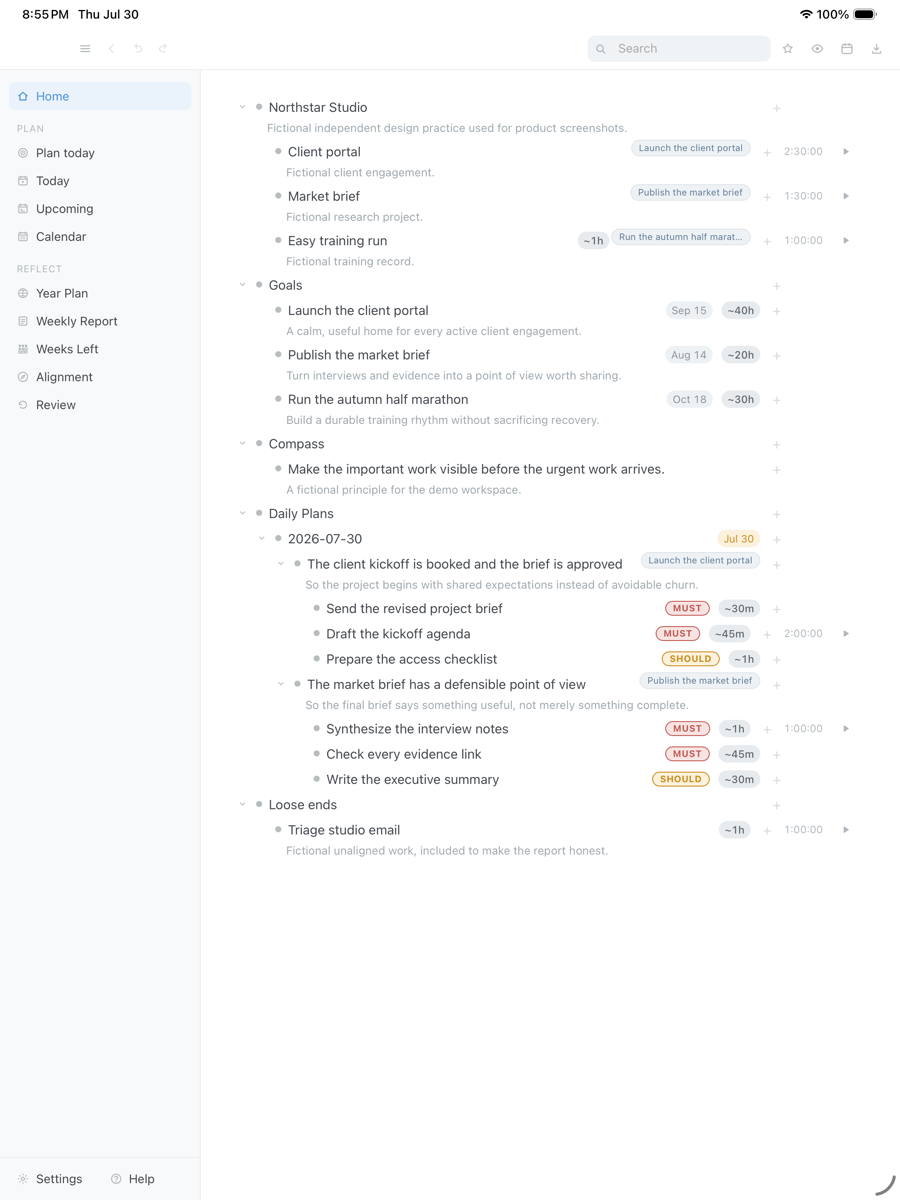
Akiflow starts the day by collecting. DayPrivate starts it by choosing. You name two or three outcomes for today, each with the Result you want by tonight and the Purpose behind it, and mark the actions under them MUST or SHOULD. Auto-block lays those actions around the Apple Calendar events you already have and names what did not fit, rather than quietly moving your afternoon. When a block ends with a MUST still open, DayPrivate's Reckoning card asks once: re-block today, re-block tomorrow, or leave it.
Under the plan, DayPrivate is a full outliner. Plans, blocks and tracked time are ordinary bullets you can zoom, mirror, search and export. That is the part Akiflow does not try to be, and the reason to consider DayPrivate at all. How the blocks work day to day is walked through on the DayPrivate time blocking page.
Outcomes with a Result and a Purpose, actions marked MUST or SHOULD underneath, and an estimate on each one. The projects and names in the capture are fictional.
Drag the capture sideways to see the rest. Open full size
When Akiflow, not DayPrivate, is the better call
You need tasks from Slack, email or Asana in one inbox. You work on Windows, in a browser or on Android. You want an AI assistant that schedules for you. You need something you can install this week. Akiflow does all four on its own pages. DayPrivate does none of them: it is Apple only, one person, no integrations inbox, and not released yet.
Akiflow vs Sunsama
Akiflow vs Sunsama, the comparison most switchers make first.
Akiflow and Sunsama are the two premium daily planners people weigh against each other most, and the prices on their own pages settle one thing quickly. Sunsama lists $22 a month billed monthly or $17 billed yearly. Akiflow lists $34 billed monthly or a $19 yearly promo. Sunsama is cheaper on both cycles, and neither has a free plan.
The difference beyond price is emphasis. Akiflow sells the universal inbox and an AI assistant, Aki. Sunsama sells a guided ritual: plan the day, work it, shut it down. If the ritual is what you want and the inbox is what you are tired of, the DayPrivate page on Sunsama alternatives covers how DayPrivate keeps a daily close without importing anyone else's tools.
DayPrivate price
DayPrivate will be eight dollars a month, or sixty nine a year.
DayPrivate has one plan with everything in it, on every Apple device you own, for one person. No team tier. If the plan lapses, the last version you paid for keeps working and the file stays yours. Against Akiflow's $34 monthly list price that is a large gap, but DayPrivate also does much less plumbing, so compare the job, not only the number. See what the DayPrivate plan includes.
One message, then nothing
Hear when the build is ready.
One email when DayPrivate is ready to install, and nothing else. No drip sequence and no newsletter.
Your address is used for that one message and nothing else.
Questions
Akiflow alternative questions, answered about Akiflow and about DayPrivate.
Is Akiflow worth it?
Akiflow is worth it if you need one inbox that pulls tasks in from many other tools, on Mac, Windows, the browser, iOS and Android, and $34 a month (or $19 a month billed yearly) is fair for that job. It is harder to justify if you mostly plan your own work, because Sunsama, Morgen, Routine, Reclaim and TickTick all list lower entry prices on their own pricing pages, and DayPrivate plans to charge $8 a month on Apple devices only.
How much does Akiflow cost per month?
Akiflow's pricing page lists Pro Monthly at $34 a month, billed monthly, and Pro Yearly at $19 a month, billed yearly and marked as a promo. There is no free plan. The 7-day trial needs a card, and Akiflow's own FAQ says the subscription begins after the trial unless you cancel. Prices checked on 29 September 2026.
Is there a free Akiflow alternative?
Yes, with limits. TickTick has a free plan capped at 9 lists and 99 tasks per list, Reclaim has a free Lite plan with a one week scheduling range and one calendar sync, and Routine has a Free plan with tasks, calendars, notes and 3 integrations, all according to their own pricing pages. None of the three is a full universal inbox like Akiflow's. DayPrivate is not free either: it will be $8 a month or $69 a year.
Akiflow vs Sunsama: which costs less?
Sunsama costs less on both billing cycles. Sunsama's pricing page lists $22 a month billed monthly or $17 a month billed yearly. Akiflow's lists $34 a month billed monthly or $19 a month billed yearly. Both sell a guided daily planning flow with integrations, and neither offers a free forever plan.
Is DayPrivate an Akiflow alternative?
Only for one kind of Akiflow user. DayPrivate has no universal inbox and no Slack, Asana or email integrations. It is a local first outliner with a clock for Mac, iPad and iPhone: you choose two or three outcomes for the day, time block them around Apple Calendar, and answer the Reckoning when a block ends unfinished. If the inbox is why you pay for Akiflow, DayPrivate is the wrong pick.
Does DayPrivate run on Windows or Android?
No. DayPrivate is native Mac, iPad and iPhone. There is no Windows build, no Android build and no web version. Akiflow's download page lists macOS, Windows, a browser version, iOS and Android, so if you plan on a PC or an Android phone, stay with Akiflow or look at Morgen, whose pricing page lists Windows, macOS, Linux, mobile and browser apps.
Can I try DayPrivate today?
Not yet. DayPrivate is in daily use and under active development, but it is not publicly released and it is not on the App Store. The form on this page sends one email when there is something to install, and nothing else.