OmniFocus
A GTD task manager with perspectives, forecasts and review. It can indent. It is not an outliner you live in all day. DayPrivate will not replace a perspectives setup.
DayPrivate / Outliner app
Local first outliner, Mac, iPad, iPhone
DayPrivate is an outline you zoom, nest, mirror and search, for people who arrived from OmniOutliner, WorkFlowy, Dynalist or Bike. The clock is attached to those bullets, so the tree and the day live in the same file.
An outliner app is a nested document, not a list and not a page per note. You indent forever, zoom any bullet into the whole screen, and edit from the keyboard. DayPrivate is that tool on Mac, iPad and iPhone: infinite nesting, zoom, mirrors, backlinks, notes under any bullet, and a jump menu. Plans, blocks and tracked time are ordinary bullets in the same file. There is no Windows build, no Android build and no web version.
The outline lives as a database file on your disk. Encrypted sync runs through your own iCloud Drive. There is no DayPrivate server. DayPrivate is eight dollars a month or sixty nine dollars a year, one plan, and it is not on the App Store yet. The form at the bottom is how you hear when there is something to install.
The category, named
Search outliner app and the results mix four unrelated products: classic Mac outliners, infinite cloud outlines, networked notebooks, and task managers that indent once. If you wanted the first family, keep reading. The other three are nearby, and they are different jobs.
The tell is what happens when you press Tab. In a list app, Tab is a subtask. In an outliner, Tab is structure. A project, a meeting note, a year of research and this morning's two outcomes can live in one tree. You zoom a bullet and the rest of the document waits above you in the breadcrumbs. You leave and come back at the same zoom. That is the craft OmniOutliner, WorkFlowy, Dynalist and Bike all share, and it is the craft DayPrivate is built on.
A list app is faster at capture and worse at holding a year. A page app is better at prose and worse at rearranging. An outliner sits in the middle: every node is both a heading and a line you can time. That last part is where most outliners stop. They will hold the thinking. They will not tell you the thinking did not fit Tuesday.
One outline, ordinary bullets
Fictional tasks, same grammar as the working build. The plan, the block and the tracked time are not three objects in three apps.
The four people usually mean
If those names are why you are here, DayPrivate sits with them, then adds a clock. It does not try to become their columns, their browser, or their Windows build.

Nearby searches
Three other names rank next to outliner app often enough that they need a short fold, not the title. If one of these is what you actually wanted, stop here and buy that.
A GTD task manager with perspectives, forecasts and review. It can indent. It is not an outliner you live in all day. DayPrivate will not replace a perspectives setup.
An elegant Apple task manager. Areas, projects, headings, a Today view. Beautiful at remembering. It does not zoom a bullet into a document, and it does not keep tracked time on the same row.
A networked notebook. Daily notes, bidirectional links, a graph. Fine if the job is a research web. Weak if the job is putting two hours on a Tuesday and hearing about it when they slip.
If the job is planning the day rather than holding the tree, the day planner app page is the comparison that starts from the clock.
What sits in the tree
Most outliners stop at text. DayPrivate keeps going without changing the object. Nothing in the planner is a special record you cannot search, mirror or export.
You write the day the way you write anything else. Enter, Tab, Shift and Tab, notes under a bullet, Cmd and K to jump. An outcome is a bullet with a Result and a Purpose. A MUST or SHOULD is a flag on a child. A block is that same child placed on hours the day actually has. A timer writes tracked time back onto the row. Zoom any of those and you are still in the outline.
Mirrors let one task live in two places without becoming a copy. Edit it under the project or under today and the original changes. Backlinks show everything that points at the bullet you are reading. Tags, stars and a live filter keep a large tree usable. Dates and estimates are typed inline. Up to fifty versions sit on a bullet if you need to walk something back.
That is why the homepage leads with outliner and not planner. The planner is a set of views over bullets you already have. If the outline were a second app, the day would drift out of the document again, which is the failure this product is written against.
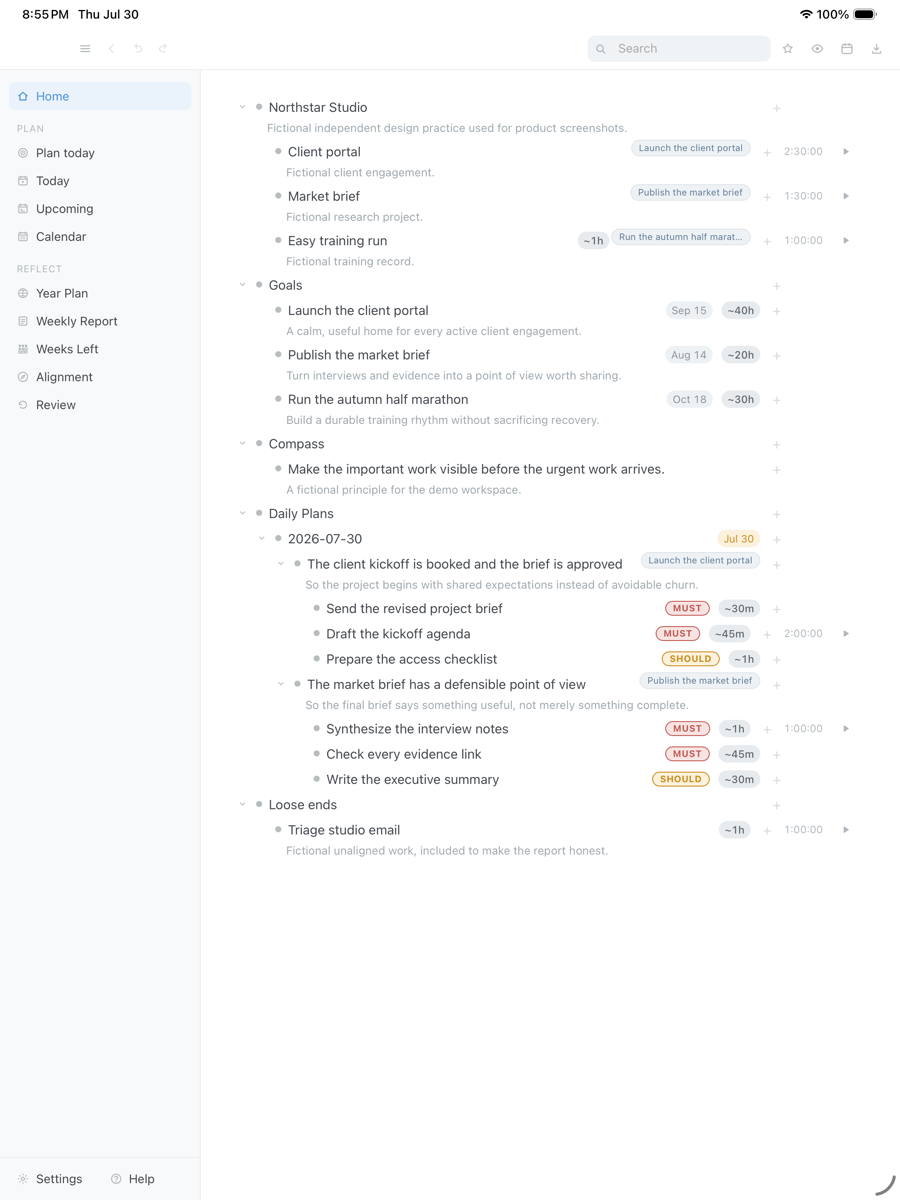
Two outcomes for the day, each with a Result, a Purpose, and MUST and SHOULD actions carrying estimates. The same bullets go on the grid. Fictional names in an isolated demo database.
Drag the capture sideways to see the rest. Open full size
The part most outliners omit
An outline can hide an overloaded day, because a tree has no length in hours. DayPrivate asks for a Result and a Purpose on the two or three outcomes today owes you, then marks the actions MUST or SHOULD. Two flags, not four. The must total is shown separately, so the day either fits or visibly does not.
Auto-block lays those bullets on a real grid, around Apple Calendar, inside your day start and day end, and names what did not fit. When a block ends with a MUST still open, the Reckoning asks one question: re-block today, re-block tomorrow, or leave it. Dismissing the card counts as a decision. It never asks twice about the same ending.
There is no AI auto-scheduler and no dump from Asana or Slack. The week view is a readout of what you did, not a week planning grid. Alignment and pace live on goals when you point work at them. None of that replaces the outline. It reads the outline back.
The grid itself is walked on the time blocking app page. This page stays with the tree.
Where the document lives
Cloud outliners are easy to start and hard to leave. Your year sits on someone else's computer, behind an account, subject to a quota or a shutdown. DayPrivate writes to a database file on your device. Settings shows the path. Export the current zoom to OPML or plain text whenever you like. CSV and a self contained HTML file export the current week or month of the weekly report, not the tree.
Sync, if you turn it on, writes encrypted change sets into your own iCloud Drive under a passphrase that stays in the device keychain. Nobody else can read those files, including this app's author. There is no DayPrivate account and no company database of outlines. The marketing site uses ordinary web analytics. The app does not.
The outline is a local database. A plane or a dead hotel connection changes nothing about editing it.
Encrypted change sets, your passphrase, your keychain. Optional. Off means the file stays on that device.
OPML or plain text for the outline. CSV or HTML for the current report period. If the project stopped tomorrow, the copy on your machine would keep opening.
Where it runs
Say it plainly, because a lot of outliner searches start on a Windows PC or in a browser. DayPrivate will not follow you there. The Mac is the full surface: menu bar timer, global quick capture, Google Calendar as a read only source, blocks mirrored back into a calendar you choose, and the optional local AI features. The iPad and the iPhone carry the whole outline, not a trimmed pocket version: zoom, mirrors, plan, grid, timers and encrypted sync. Apple Calendar is read on every device. Mirroring blocks back is Mac only.
Straight answers
Price
One plan with everything in it, on every device you own, for one person. No team tier and no feature held back for a higher one. If the plan lapses, the last version you paid for keeps working and your outline and exports stay yours. See what the plan includes.
One message, then nothing
One email when DayPrivate is ready to install, and nothing else. No drip sequence and no newsletter.
Your address is used for that one message and nothing else.
Questions
An outliner app is a document of nested bullets you can indent, zoom, fold and rearrange from the keyboard. The unit is a bullet with children, not a card or a page. DayPrivate is that kind of app first: infinite nesting, zoom, mirrors, backlinks and keyboard editing, with plans, blocks and tracked time stored as ordinary bullets in the same outline.
Yes. Your outline is a database file on your own disk. Settings shows you the exact path. Sync, if you turn it on, writes encrypted change sets into your own iCloud Drive under a passphrase held in your device keychain. There is no DayPrivate server holding the document.
No. DayPrivate is a native app for Mac, iPad and iPhone only. There is no Windows build, no Android build and no browser version, and none of the three is planned.
Those four are outliners. DayPrivate is an outliner in the same family, then it attaches a clock: outcomes with a Result and a Purpose, MUST and SHOULD flags, time blocks on a real grid, and the Reckoning when a block ends unfinished. If you want columns, a browser, or a Windows build, one of those four will fit better.
No. OmniFocus and Things are task managers. Roam is a networked notebook. DayPrivate will hold tasks and notes as bullets, but it is not GTD software and it is not a graph database. This page is for people shopping outliners.
Yes. Export the current zoom to OPML or plain text whenever you like. CSV and a self contained HTML file export the current week or month of the weekly report, not the outline tree. If a DayPrivate plan lapses, the last version you paid for keeps working and the file stays on your disk.
DayPrivate is eight dollars a month or sixty nine dollars a year. That is one plan with everything in it, on every device you own, for one person.
Not yet. The build is in daily use and under active development, but it is not publicly released and it is not on the App Store. The form on this page is how you hear when there is something to install. The product overview walks through the whole app.