DayPrivate / Sunsama alternative
Daily ritual, local file
A Sunsama alternative that keeps the ritual and drops the inbox.
People leave a premium daily planner for two reasons. The morning still works and the bill started to itch, or the integrations inbox filled today with work that never had a time. DayPrivate will not import Asana or Slack. It will let you name what today owes you, put it on a clock, and ask once when a block ends unfinished.
The short answer
DayPrivate on a Sunsama alternative shortlist.
Sunsama is a guided daily planner: choose the day, work it, shut it down. That ritual is the thing people miss when they cancel. DayPrivate keeps a ritual of its own, built into an outline you own. You pick two or three outcomes, each with a Result and a Purpose, mark actions MUST or SHOULD, and block them against hours the day actually has. When a block ends with work still open, the Reckoning asks one question. Your plan is a local file on Mac, iPad and iPhone. Encrypted sync runs through your own iCloud. There is no DayPrivate server.
DayPrivate is eight dollars a month or sixty nine a year, one plan. It is not on the App Store yet. If you need Windows, Android, a browser, or an integrations inbox, stay on Sunsama or pick another cross platform planner. DayPrivate is for the person who wanted the close of the day and did not want to rent the document.
What the search usually means
What people actually want from Sunsama, and what they are tired of.
The threads are consistent. Nobody is angry at the morning. They are tired of paying a premium monthly planner for a ritual they could almost run in a notebook, and they are tired of other people's tools emptying into today.
Sunsama's strength is the guided day. You sit down, you pull in what matters, you give it hours, you shut the day. That is a real product, and it is why people recommend it to friends who bounce off raw calendars. DayPrivate agrees with that shape and disagrees with the housing. The day should be a file you can export, not a workspace you log into.
The fatigue is also real, and it is not a dunk. Premium daily planners in this category charge a monthly price that solo users keep cancelling, then missing, then rejoining. This page will not quote a Sunsama number. Prices move. Read theirs. DayPrivate's planned price is on the homepage and further down here: eight dollars a month or sixty nine a year. That is the comparison you can stand on.

Two columns, one decision
A daily ritual on one side. A file you own on the other.
The ritual DayPrivate keeps
The part that should feel familiar if Sunsama worked for you.
- Choose the day before you sort it. Two or three outcomes, each with the Result you want by tonight and the Purpose behind it.
- Give the work hours. MUST and SHOULD sit on the actions. Auto-block lays them around Apple Calendar and names what did not fit.
- Work one thing. One timer at a time, on any bullet, plan row or block. It survives a crash.
- Close what slipped. The Reckoning is the close for a single block. Next morning a carry tray offers yesterday's unfinished work forward, one day at a time.
The file Sunsama is not
The part that is a different product, not a cheaper clone.
- A database on your disk. Settings shows the path. No account. No DayPrivate server.
- Encrypted iCloud sync you turn on. Change sets in your Drive, passphrase in your keychain.
- The outline is the planner. Plans, blocks and tracked time are ordinary bullets. Zoom, mirror, export.
- Apple only. Mac, iPad, iPhone. No Windows, no Android, no web. Calendar read everywhere. Blocks mirrored back on the Mac.
If you want the planner comparison without Sunsama in the title, use the day planner app page.
The close of the day
Shutdown review and the Reckoning are not the same question.
Both ask you to decide instead of letting unfinished work roll forward in silence. They fire at different moments and they ask different things.
A Sunsama-style shutdown looks at the whole day. You review what happened, you park what did not, you leave with a clean slate. That is a good habit. DayPrivate does not promise that guided evening as a product feature, and it does not promise weekly planning. The week view is a readout of what you did. The weekly review is derived from tracked time, blocks, carries and the calendar. It never asks you to rate the week.
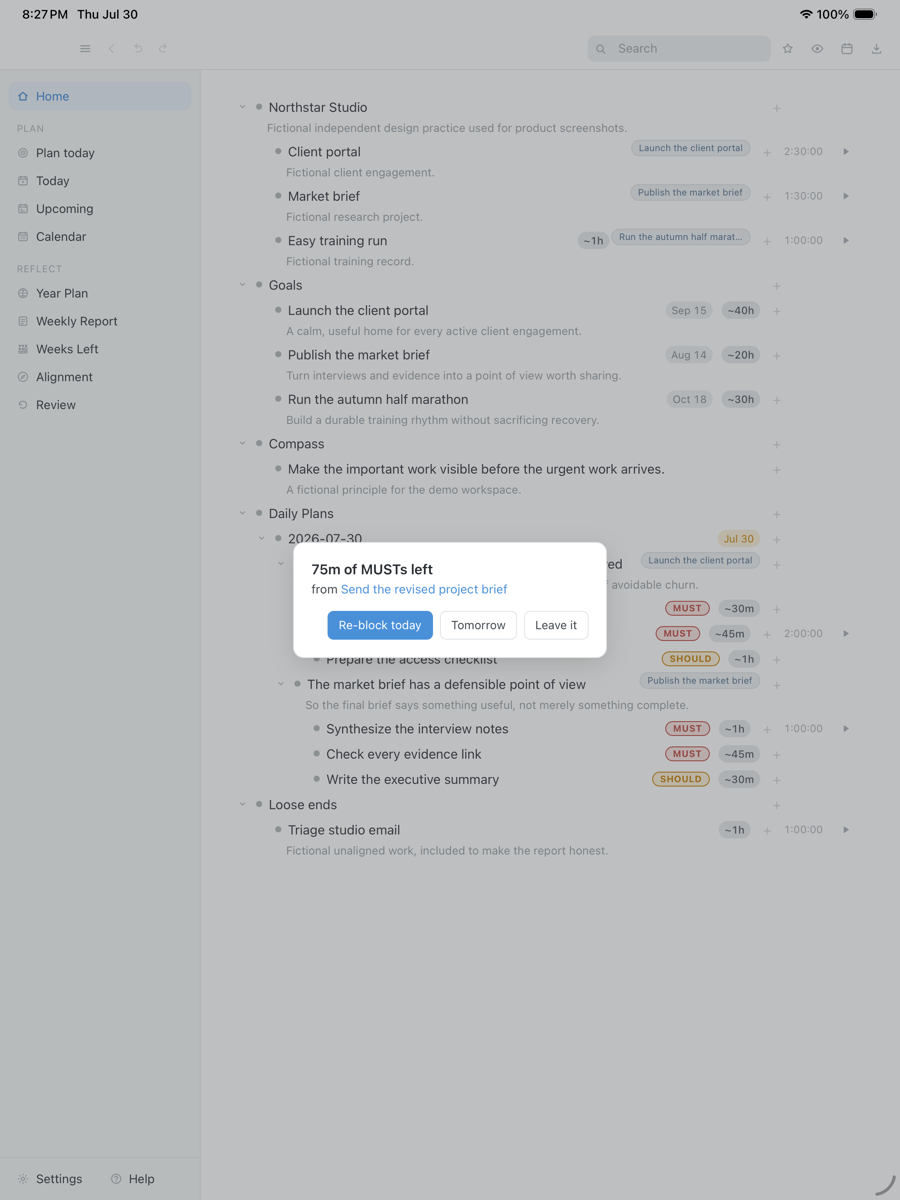
The Reckoning is smaller and earlier. When a block ends with a MUST still open, one card appears while you can still act: re-block today, re-block tomorrow, or leave it. Dismissing it is a decision, so the same ending never nags twice. That is the opposite of an overdue count climbing on its own, and it is also not a full shutdown interview. If you loved the long close, you can still take ten minutes at the end of the day. The app will not walk you through a script.
A block ended with work still open, so DayPrivate asks once what should happen to it. Re-block today, tomorrow, or leave it. Fictional tasks in an isolated demo database.
Drag the capture sideways to see the rest. Open full size
Integrations
The integrations inbox DayPrivate does not have.
Sunsama is useful in a company because it can see the work that already lives in other tools. That is also how today fills with undated junk. DayPrivate will not connect Asana, Slack, Notion boards or a school inbox. There is no channel dump and none is planned. You add work by typing it, or by pulling a live mirror from your own outline.
There is also no AI auto-scheduler. Auto-block lays out a day you have already chosen, around the calendar it can read, and tells you what did not fit. It will not rank your work or infer what today is about. If you want the software to decide the day, this is the wrong alternative.
When Sunsama is still the better call
You work across Windows and a browser. You need the team's Asana board in the same morning pass. You want a guided weekly planning session. You want something you can install this afternoon. Those are good reasons to stay. DayPrivate is Apple only, local file, one person, and not released yet.
A DayPrivate day
What the morning looks like when the inbox is gone.
Open the file
No login. The outline is already on the device. Yesterday's unfinished work is waiting in the carry tray, not hidden in another workspace.
Name what today owes you
Two or three outcomes. Result by tonight. Purpose under it. MUST and SHOULD on the actions. Past three, a quiet chip mentions it. Nothing is blocked.
Put it on hours you have
Apple Calendar is already on the grid as context. Auto-block fills free time and names the overflow. On the Mac, blocks can be mirrored back into a calendar you choose.
Answer the Reckoning
When a block ends open, decide once. The week later is a readout of tracked time, not a planning grid you have to fill on Sunday night.

Putting the work on real hours is walked in full on the time blocking app page.
The calendar it will see
Apple Calendar is read. Other people's tools are not imported.
DayPrivate reads Apple Calendar on Mac, iPad and iPhone. Those events sit beside your blocks as context and do not count toward planned or tracked time on their own. You can log a linked timed event as tracked time if you choose. On the Mac, your blocks can be mirrored back into a calendar you choose, and moving or deleting the event pulls the change back. Google Calendar is Mac only and read only, connected with your own OAuth client, tokens in your keychain.
There is no channel that pours tickets, mentions or school boards into the morning. If the reason Sunsama earned a place on your phone is that it already sees the company's work, DayPrivate will feel empty on day one. If you wanted a clean day and a clean close, the empty inbox is what you came for.
Platforms again, because this search often starts on a Windows PC. DayPrivate is native Mac, iPad and iPhone. There is no Windows build, no Android build and no browser version. The optional local AI features talk to a model on the same Mac and refuse any other endpoint. The marketing site uses ordinary web analytics. The app measures nothing.
Price
DayPrivate is eight dollars a month, or sixty nine a year.
One plan with everything in it, on every Apple device you own, for one person. No team tier. If the plan lapses, the last version you paid for keeps working and the file stays yours. See what the plan includes. For the planner you are leaving, read that vendor's own pricing page. This one will not invent their number.
One message, then nothing
Hear when the build is ready.
One email when DayPrivate is ready to install, and nothing else. No drip sequence and no newsletter.
Your address is used for that one message and nothing else.
Questions
Sunsama alternative questions worth a straight answer.
Is DayPrivate a Sunsama alternative?
It can be, if what you wanted from Sunsama was a daily ritual and a close to the day. DayPrivate has no integrations inbox, no Asana or Slack dump, and no weekly planning grid. It is a local first outliner with a clock, for Mac, iPad and iPhone only.
How is the Reckoning different from a Sunsama shutdown?
A shutdown review looks back over the whole day and asks you to close it. The Reckoning is one question at the moment a single block ends unfinished: re-block today, re-block tomorrow, or leave it. Dismissing the card counts as a decision, so it never asks twice about the same ending.
Does DayPrivate import tasks from Asana or Slack?
No. There is no integrations inbox and none is planned. You pull existing work in from your own outline as a live mirror. If dumping every channel into today is the job, Sunsama or a similar planner is the better call.
Does DayPrivate run on Windows or in a browser?
No. DayPrivate is native Mac, iPad and iPhone. There is no Windows build, no Android build and no web version.
Where does the plan live?
In a local database file on your disk. Encrypted sync, if you turn it on, runs through your own iCloud Drive. There is no DayPrivate server and no account. The marketing site uses ordinary web analytics. The app does not.
How much does DayPrivate cost?
DayPrivate is eight dollars a month or sixty nine dollars a year, one plan for one person on every Apple device you own. Premium monthly planners in this category often cost more. Check the vendor you are leaving for the current number rather than a third party page.
Can I try it today?
Not yet. The build is in daily use and under active development, but it is not publicly released and it is not on the App Store. The form on this page is how you hear when there is something to install. The product overview walks through the whole app.