DayPrivate / WorkFlowy alternative
Infinite outline, attached clock
A WorkFlowy alternative that does not meter your bullets.
WorkFlowy taught a generation to zoom. The complaint that follows, on every free tier thread, is the cap: new bullets counted, deleted bullets counted, a second app used as a scratch pad so the quota survives the month. DayPrivate is the same family of outline, stored as a file you own, with a clock on the same bullets.
The short answer on a WorkFlowy alternative
DayPrivate is a WorkFlowy-style infinite outliner for Mac, iPad and iPhone: nesting, zoom, mirrors, backlinks, notes, keyboard editing. There is no monthly bullet quota. Plans, blocks and tracked time are ordinary bullets in the same tree. When a block ends unfinished, the Reckoning asks one question.
It is a local file. Encrypted sync runs through your own iCloud. There is no DayPrivate server, no browser version, no Windows or Android build. Eight dollars a month or sixty nine a year. Not on the App Store yet. If you need the browser, stay on WorkFlowy.
The pain that sends people looking
Bullet caps and the deleted-bullet tax.
WorkFlowy's free tier has long limited how many new bullets you can add in a month, and it has counted bullets you delete against that limit. The exact number moves. Read theirs. The shape of the complaint does not: people draft somewhere else so they do not burn the quota on a sentence they will throw away.
A metered outline
A free cloud outliner that charges the month for thinking, including thinking you undo. You start editing less, which is the opposite of why you opened it.
Quota used, including deletes
A file on disk
DayPrivate does not count bullets. You can write, delete, duplicate a subtree, and undo in bursts. The limit is the file, not a monthly rule.
No bullet cap
That is not a reason to trash WorkFlowy. The paid product is a good outliner and the zoom is still the one other apps copy. The reason to look elsewhere is if the meter changed how you write, or if you want the outline to survive a cancelled account as a file on your machine. DayPrivate was built for that second case.

Fair first
What WorkFlowy still does better.
Stay on WorkFlowy if
These are real wins. DayPrivate does not pretend otherwise.
- You live in a browser. WorkFlowy is there on any machine. DayPrivate is not.
- You need Windows or Android. DayPrivate is Mac, iPad and iPhone only.
- You want the smallest possible app. Zoom, indent, done. No clock to learn.
- Your muscle memory is a decade deep. Shortcuts you already have are worth more than a cleaner file story.
- You need it this afternoon. WorkFlowy is shipping. DayPrivate is not on the App Store yet.
Move if this is the job
The same outline family, plus a day that answers.
- You are already on Apple devices. One outline on Mac, iPad and iPhone.
- The quota changed how you write. No monthly bullet cap, including deletes.
- You want a file. Local database, OPML export, encrypted iCloud you turn on.
- The outline should own the day. Outcomes, MUST and SHOULD, blocks, the Reckoning.
- You do not want a company server. There is no DayPrivate account holding the tree.
The shared craft
An infinite outline that also holds the day.
If you already think in zoom and mirrors, the first hour in DayPrivate should feel like coming home, then like someone handed you a clock.
Click a bullet's dot and it becomes the whole page, with breadcrumbs back out. The zoom you left in is the zoom you return to. Enter, Tab, Shift and Tab, move, complete, duplicate, delete a subtree, undo in bursts. Shift and Enter opens a note under any bullet. Cmd and K jumps anywhere. Type two brackets to link. Backlinks show everything that points here. Mirrors let one task live in two places without becoming a copy.
- Ship the onboarding rewrite
- Result: two qualified leads finish without emailing
- Purpose: December closes on what July started
- Draft the three empty states
- 09:00 block, tracked 1h 10m
Those last lines are still bullets. That is the difference you cannot get by gluing WorkFlowy to a calendar. The plan, the block and the tracked time search, mirror and export with everything else. The broader outliner comparison, including OmniOutliner, Dynalist and Bike, sits on the outliner app page.
Mirrors are the other half of the WorkFlowy habit people miss when they try a page app. One task that genuinely lives under a project and under today. Edit, complete or time it anywhere and the original changes. A copy would drift. A link would rot. A mirror is the same bullet seen twice. Dates, estimates, tags and stars are typed on the row. History keeps up to fifty versions per bullet, restorable through the normal undo path. None of that requires a monthly allowance.
The difference
The clock is the reason to switch, not a prettier zoom.
WorkFlowy will hold a year of thinking. It will not tell you the thinking did not fit Tuesday. DayPrivate asks for a Result and a Purpose on the two or three outcomes today owes you, marks actions MUST or SHOULD, and puts them on hours the day actually has. Apple Calendar is read as context. On the Mac, blocks can be mirrored back.
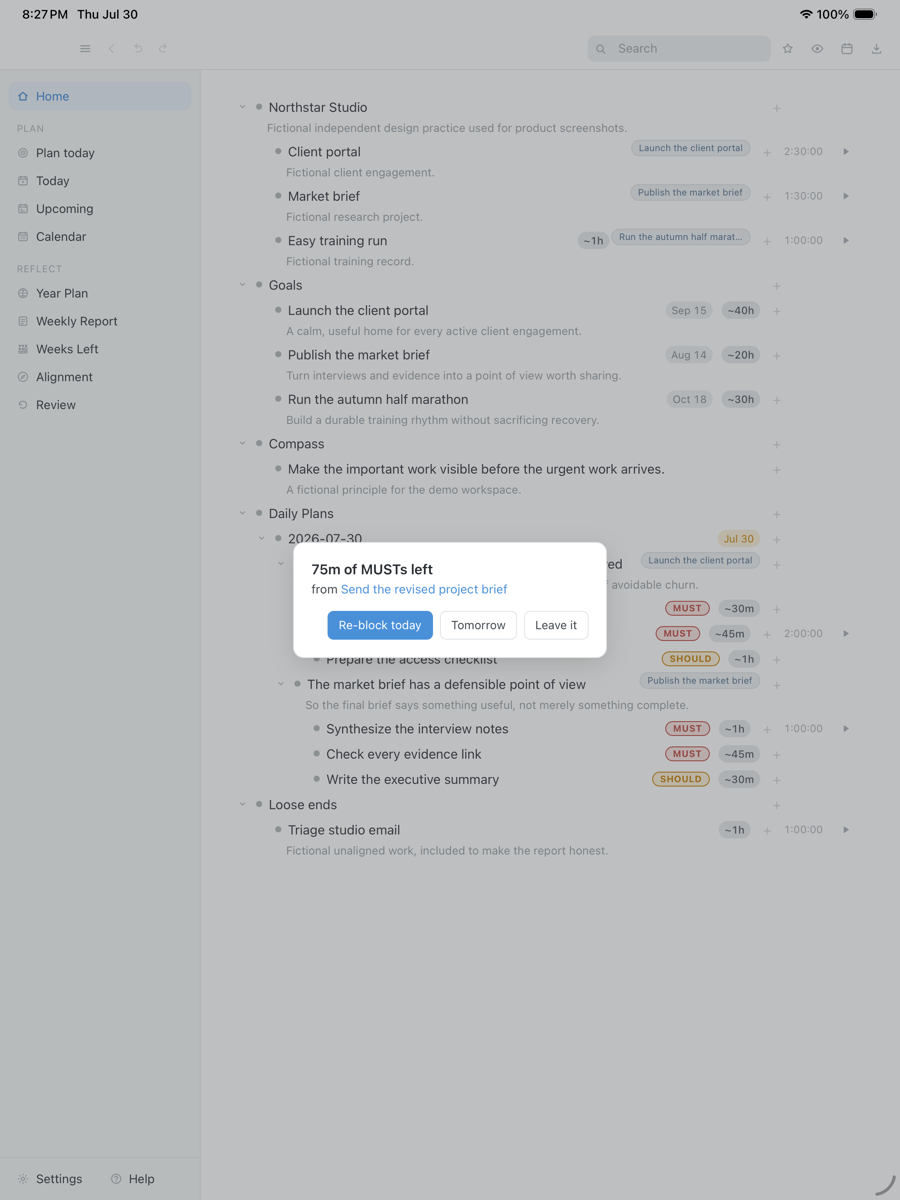
When a block ends with a MUST still open, the Reckoning asks once: re-block today, tomorrow, or leave it. That is the attached clock. There is no AI auto-scheduler and no Asana or Slack dump. The week view is a readout of what you did, not a week planning grid.
Next morning a carry tray offers yesterday's unfinished work forward, one day at a time. Nothing accumulates behind your back and nothing disappears. WorkFlowy will still have the bullet. DayPrivate will also have decided what the bullet is doing today, and it is only worth a switch if you wanted that decision. If you did not, the quota is cheaper to live with than a clock you will ignore.
A block ended with work still open. The Reckoning is one question, on the same bullets you zoomed this morning. Fictional tasks in an isolated demo database.
Drag the capture sideways to see the rest. Open full size
Cloud document versus file
Your outline is a file, not a tab.
WorkFlowy's document lives on WorkFlowy. That is convenient and it is also the lock. DayPrivate writes a database file to your disk. Settings shows the path. Export the current zoom to OPML or plain text. CSV and HTML export the current week or month of the weekly report, not the tree. Sync, if you want it, is encrypted change sets in your iCloud Drive under a passphrase in your keychain. Nobody else can read those files, including this app's author.
The marketing site uses ordinary web analytics. The app does not. Native Mac, iPad and iPhone. No Windows, no Android, no web. If the project stopped tomorrow, the copy on your machine would keep opening.

Where it runs
Native Mac, iPad and iPhone. No Windows, no Android, no web.
WorkFlowy's advantage is that a browser is everywhere. DayPrivate's advantage is that the file is on the device you already write on. The Mac is the full surface: menu bar timer, global quick capture, Google Calendar as a read only source, blocks mirrored back into a calendar you choose, optional local AI that refuses any endpoint that is not this machine. The iPad and the iPhone carry the whole outline, not a lite zoom. Apple Calendar is read on all three.
If your day happens on a Windows PC or an Android phone, this is the wrong alternative. Pick WorkFlowy, Dynalist or another cross platform outliner and stop reading. The outliner app page maps that aisle without the WorkFlowy title.
Straight answers
When WorkFlowy is still the right app.
- You need a browser tab on a work PC. DayPrivate will not be there. WorkFlowy will.
- You share an outline. DayPrivate has no shared boards, no assignees, no comments.
- You want only zoom, never a clock. Paying for a planner you will ignore is a worse deal than a metered free tier you already understand.
- You want it today. WorkFlowy is shipping. DayPrivate is in daily use and not on the App Store yet.
- You want the software to schedule the day. There is no AI auto-scheduler and no dump from Asana or Slack.
Price
DayPrivate is eight dollars a month, or sixty nine a year.
One plan, every Apple device you own, one person. If the plan lapses, the last version you paid for keeps working and the file stays yours. WorkFlowy publishes its own current price. Read that, not a third party page. See what the DayPrivate plan includes.
One message, then nothing
Hear when the build is ready.
One email when DayPrivate is ready to install, and nothing else. No drip sequence and no newsletter.
Your address is used for that one message and nothing else.
Questions
WorkFlowy alternative questions.
Is DayPrivate a WorkFlowy alternative?
Yes, if what you wanted from WorkFlowy was an infinite zoom outline with mirrors and keyboard editing. DayPrivate is built in that tradition, then attaches a clock. It is a local file on Mac, iPad and iPhone. It is not a browser app and it is not a Windows or Android app.
Does DayPrivate have a bullet cap?
No. There is no monthly bullet quota and deleted bullets are not counted against you. The outline is a file on your disk. The limit is the size of the file, not a free tier rule.
What does WorkFlowy still do better?
The browser, Windows and Android, a tiny learning curve, and a decade of muscle memory. If you need any of those, stay. DayPrivate is the alternative when you are already on Apple devices and you want the outline to own the day.
Where does the outline live?
In a local database file. Encrypted sync, if you turn it on, writes change sets into your own iCloud Drive. There is no DayPrivate server.
How much does DayPrivate cost?
Eight dollars a month or sixty nine dollars a year, one plan, one person, every Apple device you own. WorkFlowy's own pricing is on WorkFlowy's site. This page will not invent their current numbers.
Can I try DayPrivate today?
Not yet. The build is in daily use and under active development, but it is not publicly released and it is not on the App Store. The form on this page is how you hear when there is something to install. The product overview walks through the whole app.