DayPrivate / Logseq vs Joplin
Two open source note apps, compared from the outside
Logseq vs Joplin is a choice between the outliner and the notebook.
Logseq and Joplin get compared because they share the two things people search for first: both are free, and both are open source under the AGPL. Past that they are built for different hands. Logseq is an outliner where every bullet is a block you can link to, and the daily journal is the front door. Joplin is a notebook app where whole markdown notes live in notebooks and tags, and sync runs through a service you pick. This DayPrivate page sets the two side by side with figures from each project's own site, docs and GitHub, checked on 12 October 2026. DayPrivate makes neither app and sells a third kind of tool, which is said once here and again near the end.
The short answer
Choose Logseq if you think in nested bullets that link to each other and want tasks, queries and flashcards built in. Choose Joplin if you want notes filed in notebooks, a web clipper, sync through Dropbox, OneDrive, Nextcloud, WebDAV or S3, and optional end to end encryption. Both apps are free, open source and run on Windows, macOS, Linux, iOS and Android.
- Best for outlining and a daily journal: Logseq. Free, AGPL. Its markdown version, Logseq OG, gets maintenance but no new features, and the database version is in beta.
- Best for filed notes and encrypted sync: Joplin. Free, AGPL. Optional Joplin Cloud from €2.99 a month, or sync through a service you already pay for.
- Best if your notes became a day plan: DayPrivate. An outliner with an hour grid and timers, $8 a month or $69 a year, Mac, iPad and iPhone only, not publicly released yet.
Prices are from Joplin's plans page and Logseq's own posts, checked on 12 October 2026. Joplin lists its prices in euros. Both projects ship often, so check the current state before moving years of notes.
The one difference
Logseq thinks in bullets, Joplin thinks in notes filed in notebooks.
Almost every other gap between Logseq and Joplin follows from this one, so settle it before you read a feature table.
The bullet is the unit
Every line in Logseq is a block you can link to, embed, collapse or mark TODO. Logseq's docs start new users on the Journals page, so today's page is where writing begins, and topic pages fill up from references to them.
The note is the unit
Joplin's help calls it a note taking and to-do application whose notes are in markdown. You file each note in a notebook, nest notebooks as sub-notebooks, and add tags. A link to another note points at that note's ID, which the desktop app writes for you when you drag one note into another.
A graph against a tree
The vendor comparison ranking second for Logseq vs Joplin calls Joplin's organisation hierarchical and tree-like and Logseq's graph-like, aimed at power users who live on the keyboard. That matches what each app's own docs show.
A quick test: look at the last thing you wrote. If it is a nest of short lines several levels deep, Logseq will fit. If it is a self-contained note you would file under a project, Joplin will. If you are weighing the outliner against a page first app instead, the DayPrivate comparison of Obsidian and Logseq covers that split.
Side by side
Logseq vs Joplin feature by feature, with DayPrivate beside them.
Each Logseq and Joplin cell comes from that project's own site, docs or GitHub page, as shipped without plugins. DayPrivate's column is written from the working build.
| Question | Logseq | Joplin | DayPrivate |
|---|---|---|---|
| Price of the app | Free | Free | $8 a month or $69 a year |
| Open source | Yes, AGPL 3.0 | Yes, AGPL 3.0 or later | No |
| Unit of writing | The bullet, inside a journal or page | The note, inside a notebook | The bullet, inside one outline |
| How notes are stored | Markdown or Org files in Logseq OG; a database in the new version | A local database; markdown on export | One local database file |
| Platforms | Windows, macOS, Linux, iOS, Android | Windows, macOS, Linux, iOS, Android, terminal | macOS, iPadOS, iOS |
| Sync | Sync in beta for Open Collective sponsors, or your own file sync | Joplin Cloud, Joplin Server, Dropbox, OneDrive, Nextcloud, WebDAV, S3 or a folder | Through your own iCloud Drive |
| End to end encryption | Not stated in Logseq's Sync setup post | Yes, optional, switched on by you | Yes, always on for sync |
| Links between notes | Square bracket page links and block references | Markdown links that point at a note ID | Links between bullets |
| Backlinks | Built in, linked and unlinked references | Through community plugins | Built in |
| Tasks built in | LATER, NOW, DONE or TODO, DOING, DONE markers | To-do notes and checkboxes, with alarms | MUST and SHOULD, with estimates |
| Queries | Simple and advanced queries | Search with filters such as tag: and notebook: | No |
| Web clipper | No official clipper in Logseq's docs | Chrome and Firefox extensions | No |
| Visual board | Whiteboards | Whiteboard in JSON Canvas format, desktop only | No |
| Flashcards and PDF highlights | Built in, PDF highlights on desktop | Not in Joplin's docs; PDFs attach to notes | No |
| Tasks on an hour grid, with timers | No | No | Yes, the whole point |
Sources: joplinapp.org home, plans, help, FAQ, to-dos, markdown, import and export, end to end encryption and whiteboard pages; the Joplin and Logseq GitHub repositories and license files; Logseq docs on the Journals page, queries, flashcards and PDF highlights; Logseq's 2024 Sync setup post. Where a Logseq cell says its docs or post do not list something, community plugins or later releases may add it.
Where the notes live
Logseq keeps files you can open, Joplin keeps a database you export from.
This is the difference between Logseq and Joplin that most rankings on this search skip, and it decides how easy it is to leave either app later.
Moving between them is one way and partial. Joplin imports markdown files, so the text of a Logseq OG graph comes across, but block references, queries and page links are Logseq syntax that Joplin does not read. DayPrivate keeps one local database file too, exports OPML and plain text, and has no Logseq or Joplin importer.
What it costs
How much Logseq and Joplin cost once you add sync.
Logseq and Joplin are both free to download, so the price question is what you pay to reach the same notes from a second device. These are the figures on each project's own pages, checked on 12 October 2026, next to DayPrivate's one plan.
| Plan | Price | What it buys |
|---|---|---|
| Logseq app | Free | Open source under the AGPL 3.0, both Logseq OG and the database version. |
| Logseq Sync | $5 or $15 a month as a sponsor | Offered in beta through Open Collective sponsorship, per Logseq's 2024 Sync setup post, with a normal subscription promised for general launch. |
| Joplin app | Free | Open source, AGPL 3.0 or later. Syncs free through Dropbox, OneDrive, Nextcloud, WebDAV, S3 or a folder. |
| Joplin Cloud Basic | €2.99 a month, €28.69 a year | 2 GB, attachments up to 10 MB, publishing, the Web App. Can receive shared notebooks but not share them. |
| Joplin Cloud Pro | €5.99 a month, €57.48 a year | 30 GB, attachments up to 200 MB, notebook sharing and Email to Note. |
| Joplin Cloud Pro 100 GB | €9.99 a month, €95.88 a year | Pro with 100 GB of storage. |
| Joplin Cloud Teams | €7.99 a user a month, €80.28 a user a year | 50 GB, user management and share permissions, minimum two users. |
| DayPrivate | $8 a month or $69 a year | One plan with everything, encrypted sync through your own iCloud Drive included. Not on sale yet. |
Joplin is the easier of the two to sync without a subscription, because its sync targets are built into the app. Logseq OG users sync the graph folder with iCloud Drive, Git or another file sync tool instead. The MakeUseOf writer named exactly this as why they left Obsidian for Joplin: no subscription needed and reliable sync through cloud storage they already had.
Logseq features, Joplin features
Logseq features and Joplin features, where they part ways.
Shared ground first: Logseq and Joplin are both free, AGPL licensed, keep your notes on your own device, write in markdown, and run on the same five platforms. These are the features each one builds in that the other leaves to plugins or skips.
Logseq's core: links at the bullet level
Any bullet can be referenced or embedded elsewhere and edited where it appears. Every page lists linked and unlinked references below it. In Logseq's own forum thread on why people pick it, one reply singles out references you can edit in place.
Logseq's extras: queries, flashcards and PDF highlights
Logseq queries pull tasks or tagged blocks from across the graph. Tagging a block #card makes it a flashcard. PDFs can be highlighted on desktop with the highlights linked back into your notes.
Logseq's core: the journal as front door
Logseq opens on today's journal, so short bursts of thought and tasks land somewhere without a decision. A reply in the Logseq forum thread credits this for making quick capture easy.
Joplin's core: sync and encryption options
Joplin syncs through Joplin Cloud, Joplin Server, Dropbox, OneDrive, Nextcloud, WebDAV, S3 or a folder. Its end to end encryption is off until you turn it on with a master password on one device, after which only you can read the notes, notebooks, tags and attachments.
Joplin's strength: clipping and importing
Joplin's web clipper for Chrome and Firefox saves pages or screenshots as notes. It imports Evernote ENEX files with formatting and attachments, and also imports markdown files and OneNote.
Joplin's extras: two editors and to-do alarms
Joplin offers a markdown editor with a preview pane and a rich text editor. A note can be a to-do with an alarm, which shows a notification on desktop and mobile. It also has a terminal app.
From people who use them
What Logseq and Joplin users report in the pages ranking for this search.
The pages ranking for Logseq vs Joplin are a vendor comparison, two grid tools, a Logseq forum thread and a MakeUseOf write up. None of them puts the two apps side by side in full, so here is what each one adds, with who said it.
Joplin's plugin shelf is smaller
The MakeUseOf writer found Joplin's plugin selection noticeably smaller than Obsidian's and changed their habits to fit. Joplin's plugin manifest listed 373 plugins on 12 October 2026, three of them for backlinks.
Joplin's editor takes adjusting to
The same writer said the separate editor and preview panes felt clunky at first. Their workflow settled into notebooks per project, clipped pages and to-do lists that pull together across notebooks.
Logseq is weaker for long writing
In the Logseq forum thread, one member said long form writing is not something they liked doing in Logseq, and another found Obsidian's interface more polished.
Logseq is stronger for tasks in context
Another reply in that thread said the outliner simply made more sense to them and task management felt better. A third praised the number of built in features that combine into different workflows.
Both projects are busy. On GitHub on 12 October 2026, Joplin had 56,701 stars and its latest release, v3.7.21, dated 25 September 2026. Logseq had 45,216 stars. Both had commits pushed that day.
The third name in the search
Joplin, Logseq or Obsidian: where Obsidian fits beside the two open source apps.
Two of the pages ranking for Logseq vs Joplin pull Obsidian in, and so does a People Also Ask question. Obsidian is page first rather than bullet first, free for personal and commercial use, and the only one of the three that is not open source. It shares Logseq OG's plain markdown folder, so the two can even work on the same notes, and it shares Joplin's notes-as-documents shape. If open source code is your reason for looking at Logseq and Joplin in the first place, Obsidian is out. If it is plain files, Logseq OG and Obsidian beat Joplin. The Obsidian vs Logseq page, with Sync prices and the 2026 Logseq split works through that pairing in detail.
Where DayPrivate fits
When neither Logseq nor Joplin is the problem, and DayPrivate is the fix.
Logseq's TODO markers and Joplin's to-dos with alarms both show the same drift: a notes app slowly turned into a task list. That is the one case where DayPrivate belongs in a Logseq vs Joplin decision.
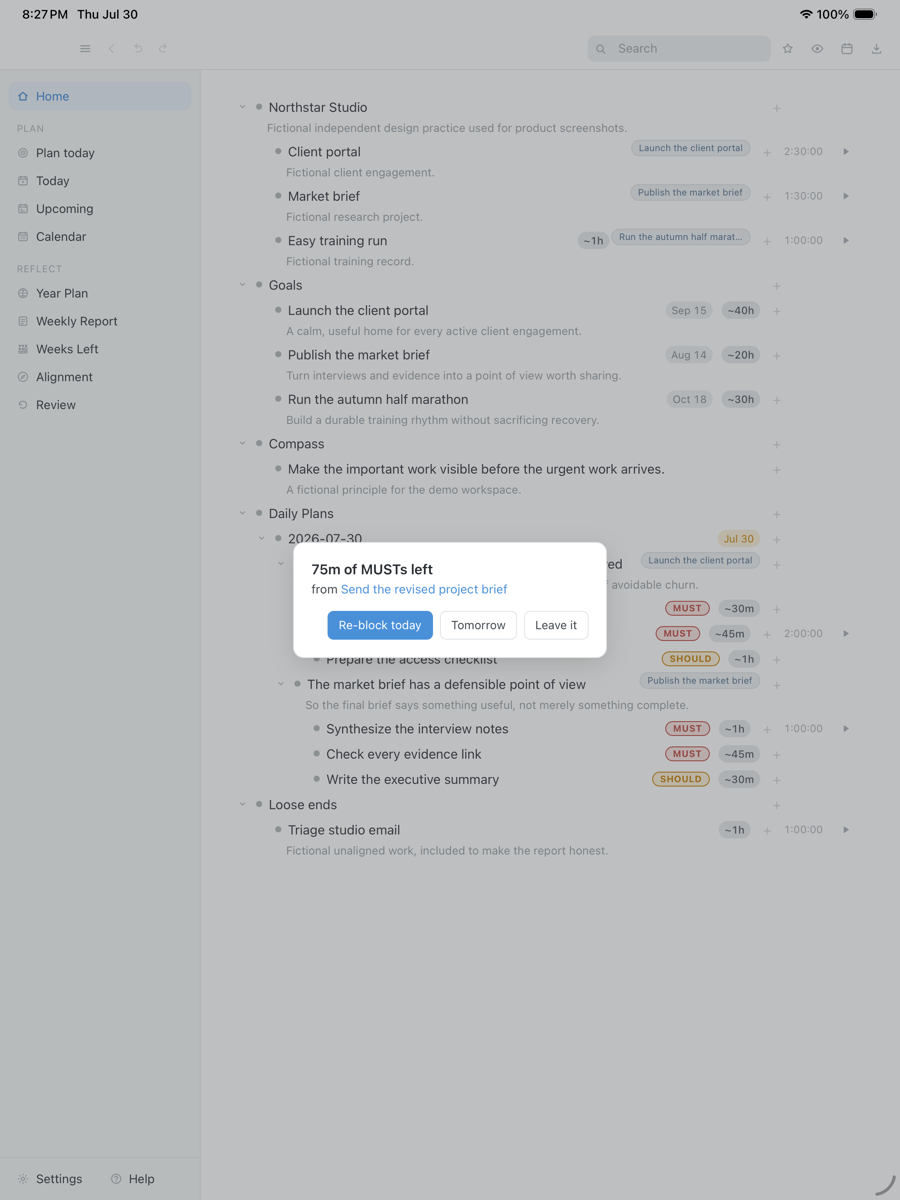
Logseq and Joplin both record what you wrote. Neither puts a task on the hours of a real day, times it, or says anything when the time runs out with the task still open. DayPrivate keeps an outliner, with nesting, zoom, mirrors, links and backlinks, and adds that half. The day opens as two or three outcomes with actions marked MUST or SHOULD, the work goes onto an hour grid around your Apple Calendar, a timer runs on the bullet itself, and when a block ends with a MUST still open, one card asks whether to re-block it today, tomorrow, or leave it. The DayPrivate outliner, compared with other outliners shows the writing side.
Seventy five minutes of MUSTs are still open when the block runs out, so DayPrivate asks once: re-block today, tomorrow, or leave it. A real capture from the working build, with fictional work in it.
Drag the capture sideways to see the rest. Open full size
If you are leaving Logseq rather than choosing it, the Logseq alternative guide sorted by what you are leaving for lists the options by requirement and says plainly which ones DayPrivate does not meet.
Straight answers
When DayPrivate is the wrong answer to Logseq vs Joplin.
- You want open source. Logseq and Joplin are both AGPL. DayPrivate is closed source.
- You want free. Both note apps are free. DayPrivate is $8 a month.
- You want markdown files or a choice of sync service. Logseq OG gives you files and Joplin gives you eight sync targets. DayPrivate keeps one local database file, syncs only through iCloud Drive, and exports OPML and plain text.
- You use Windows, Linux or Android. Logseq and Joplin run there. DayPrivate is Mac, iPad and iPhone only.
- You clip the web or are leaving Evernote. Joplin's clipper and ENEX import do that job. DayPrivate does neither.
- You want to install something today. Logseq and Joplin are a download away. DayPrivate is in daily use by its author and not publicly released.
Price
DayPrivate costs eight dollars a month, or sixty nine a year.
DayPrivate is one plan with everything in it, on every Apple device you own, for one person, with encrypted sync through your own iCloud Drive included. It does a different job from Joplin Cloud or Logseq Sync: those move your notes between devices, DayPrivate plans your day. If the plan lapses, the last version you paid for keeps working and your outline and exports stay yours. See what the DayPrivate plan includes.
One message, then nothing
Hear when DayPrivate is ready.
One email when DayPrivate is ready to install, and nothing else. No drip sequence and no newsletter.
Your address is used for that one message and nothing else.
Questions
Logseq vs Joplin questions, answered by DayPrivate.
Is Logseq better than Joplin?
Neither is better across the board, because they are different kinds of app. Logseq is an outliner: every line is a block you can link to, and the daily journal is where you write. Joplin is a notebook app: you file whole markdown notes into notebooks and tags, and link notes by their ID. Pick Logseq if you think in nested, linked bullets and want built in queries and flashcards. Pick Joplin if you want tidy notebooks, a web clipper, a choice of sync services and optional end to end encryption. DayPrivate is a third thing: an outliner with an hour grid and timers, for people whose notes turned into a to do list.
Which is better, Joplin, Logseq, or Obsidian?
It depends on the unit you think in. Logseq is for nested bullets and a daily journal. Obsidian is for pages of markdown with a large plugin ecosystem, and it is free but not open source. Joplin is for notebooks of notes that sync through a service you pick, with optional end to end encryption. Logseq and Joplin are both open source under the AGPL; Obsidian is the only one of the three whose code is closed. Logseq OG and Obsidian keep plain markdown files you can open in any editor, while Joplin keeps a database and exports markdown when you ask.
Is Logseq worth it?
Logseq costs nothing, so the question is whether it is worth your time. It is if you outline in linked bullets and like opening the app on today's journal, because tasks, queries, flashcards and PDF highlights are built in. Be aware of two things before you move years of notes into it. In April 2026 Logseq split into Logseq OG, which keeps markdown files and gets maintenance but no new features, and a database version that Logseq's GitHub page still calls beta. And its official sync has been offered only as a beta to Open Collective sponsors.
What is better than Joplin?
Nothing is better for everyone, so name what Joplin lacks for you. If it is linking between ideas, Logseq links any bullet to any other and shows backlinks without a plugin, while Joplin needs a community plugin for backlinks. If it is plain files on disk, Logseq OG and Obsidian keep markdown files, while Joplin's own FAQ calls its sync folder basically just a database. If it is a hosted team workspace, Notion is built for that. If your notes have become a day plan, DayPrivate adds an hour grid and timers to an outliner, at $8 a month on Mac, iPad and iPhone.
Which is better, Joplin or Notion?
They solve different problems. Joplin keeps your notes on your own devices, works offline first, and syncs through a service you choose, with optional end to end encryption, and the app is free and open source. Notion keeps your workspace in its own hosted account and is built around pages, tables and boards for teams that share and set permissions. Choose Joplin for private notes you control; its paid Joplin Cloud Pro and Teams plans add notebook sharing if you need some. Choose Notion if working with other people is the point. DayPrivate is single person only and has no team features at all.
How much does Joplin Cloud cost compared with Logseq Sync?
Joplin's plans page lists Joplin Cloud Basic at €2.99 a month or €28.69 a year for 2 GB, Pro at €5.99 a month or €57.48 a year for 30 GB, and Pro 100 GB at €9.99 a month or €95.88 a year. Teams is €7.99 per user a month with a minimum of two users. You do not need any of them, because Joplin also syncs through Dropbox, OneDrive, Nextcloud, WebDAV, S3 or a folder. Logseq Sync was offered in beta to Open Collective sponsors at $5 or $15 a month. DayPrivate syncs through your own iCloud Drive inside its $8 a month.
Can I move my notes from Logseq to Joplin?
Partly. Joplin can import markdown files, so the text of a Logseq OG graph comes across. What does not survive cleanly is what made it Logseq: block references, embeds, queries and page links are Logseq syntax, and Joplin links notes by an internal ID rather than by page name. The Logseq database version does not store markdown files, so export from it first. DayPrivate has no Logseq or Joplin importer either.
Does Joplin have backlinks like Logseq?
Not built in. Joplin links to another note by putting that note's ID in a markdown link, which the desktop app creates when you drag one note into another or choose Copy Markdown link. Backlinks come from community plugins: Joplin's plugin list on 12 October 2026 includes Automatic Backlinks to note, Easy Backlinks and Backlinks Navigator. Logseq shows linked and unlinked references under every page with nothing added. DayPrivate has links and backlinks between bullets built in.
Is Joplin still being developed?
Yes. Joplin's GitHub repository had its latest release, v3.7.21, on 25 September 2026, with commits pushed on 12 October 2026. Its documentation now covers a desktop whiteboard stored in the open JSON Canvas format, with mobile support listed as planned. Logseq is active too, but its new work goes into the database version, which its GitHub page calls beta, while Logseq OG gets maintenance only.
Where does DayPrivate fit if I am choosing between Logseq and Joplin?
Only if what you actually need is a planner. Logseq and Joplin both store what you wrote, and Joplin's to-dos can ring an alarm, but neither puts your work on the hours of the day or times it. DayPrivate is an outliner with nesting, zoom, mirrors, links and backlinks, plus an hour grid around your Apple Calendar, a timer on each bullet, and one card when a time block ends with a MUST still open. It costs $8 a month or $69 a year, runs on Mac, iPad and iPhone only, is not open source, and is not publicly released yet.